
JMRI
Seccions d'aquesta pàgina 7
01General#
- Modelisme / Modelism
- JMRI
- Ajuda / Help
- Issues
- Z21 turnout timeout
- Z21 - 1 second timeout sending turnout commands #7713
- Z21 turnout improvements. #8199 (2 Mar 2020)
- Improvements to XpressNet turnouts. Apply immediatePipedOutputStream anywhere applicable #8246 (16 Mar 2020)
- use
the right off message #8876 (28 Jul 2020)
git remote add pabender
                              https://github.com/pabender/JMRI.git
git fetch pabendergit checkout problemtestsant clean && ant debug && ant decoderpro
- ...
- Z21 turnout timeout
02Instal·lació / Installation#
- JMRI Install Guide: Linux
- Download
- JMRI / JMRI
(Github)
- cescp / JMRI (fork)
- From package
- From source
- JMRI Code: Getting the Code
- Steps
- Dependències /
Dependencies
- Mageia
urpmi git
- Mageia
git clone https://github.com/JMRI/JMRI.gitcd JMRI- Choose one of the following methods:
-
dependencies
build
run
debug ant - Mageia:
urpmi ant rhino
ant -p
ant clean
ant debug
ant decoderproant panelproant package-linuxcd dist/Linux/JMRI./DecoderPro- ./PanelPro
- ...
maven
mvn testmvn compile net.ossindex:ossindex-maven-plugin:auditmvn versions:display-dependency-updatesmvn versions:display-plugin-updates
-
mvn antrun:run
                                          -Danttarget=decoderpro
mvn antrun:run -Danttarget=panelpro
Eclipse - Eclipse
- Help -> Install new software
- Work with: ...
- Eclipse Java Development Tools
- m2e Maven integration for Eclipse
- Work with: ...
- Help -> Install new software
JMRI/build.xml
- Debug As: 2 Ant Build
- decoderpro
- Maven Build
- JMRI DecoderPro
- Main -> Base directory:
${workspace_loc:/JMRI}
- Environment
- Variable:
_JAVA_OPTIONS - Value:
-Dawt.useSystemAAFontSettings=lcd
- Variable:
- Main -> Base directory:
- JMRI PanelPro
- JMRI DecoderPro
NetBeans
Aquesta taula continua cap a la dreta — desplaça-la o gira el mòbil.
- Mageia:
-
- Dependències /
Dependencies
- Problemes / Problems
- ant debug
   [script]
                              java.lang.NoClassDefFoundError:
                              org/mozilla/javascript/Scriptable

                              ...

                                 [script] Caused by:
                              java.lang.ClassNotFoundException:
                              org.mozilla.javascript.Scriptable

...- Solució / Solution
- ant debug
- Problemes / Problems
- Lletres lletges / Ugly fonts
- Solució / Solution
- Java Runtime Environment fonts
export
                              _JAVA_OPTIONS='-Dawt.useSystemAAFontSettings=on'
DecoderPro
- Solució / Solution
- Lletres lletges / Ugly fonts
- Directoris / Directories
-
Settings dir Profile Panel launch DecoderPro, PanelPro --settingsdir=.../jmri_second DecoderPro, PanelPro --profile=Profile_1
preferences Edit / Preferences / Config Profiles / Search Paths Edit / Preferences / Config Profiles / Config Profiles PanelPro: Panels / Open Panels...
/home/<user>/.jmri/
- profiles.xml
- log/
- preferences/
- preferences.properties
My_JMRI_Railroad.jmri/
El _meu_ferrocarril_al_JMRI.jmri/- roster.xml
- roster/
- loco_1.xml
- static_decoder_1.xml
- ...
- profile/
- profile.xml
- <connection>...
- profile.properties
- profile.xml
- programmers/
- signal/
- WarrantPreferences.xml
- throttle/
- ThrottlesPreferences.xml
- WiThrottlePreferences.xml
- panel1.xml
- panel2.xml
- ...
Profile_1.jmri/
- profile/
- profile.xml
- profile.properties
- programmers/
- throttle/
- ThrottlesPreferences.xml
- WiThrottlePreferences.xml
...
.../jmri_second/
- profiles.xml
- log/
- preferences/
- preferences.properties
My_JMRI_Railroad.jmri/
...
...
Aquesta taula continua cap a la dreta — desplaça-la o gira el mòbil.
-
- ...
03Maquinari / Hardware#
- Estació
de control / Command station
- JMRI preferences (from DecoderPro
or PanelPro)
- Edit / Preferences...
- Roco / Fleishcmann
- JMRI preferences (from DecoderPro
or PanelPro)
- Descodificadors / Decoders
- ...
04Desenvolupament / Development#
- JMRI: Technical Information
- Logging
- JMRI Code: How to Use the Logging Facilities
- JMRI/default.lcf
log4j.rootCategory= INFO, A1,
                          T, R

                          ...

                          log4j.category.jmri.jmrix=DEBUG

log4j.category.jmri.jmrit.symbolicprog.FnMapPanel=DEBUG
- Eclipse
- New decoder file
- Z21
central station
- JMRI/java/src/jmri/jmrix/roco/
- ...
- Usage of Z21 LAN Protocol
- Z21
- Z21 Traffic
- Send z21 command
- Examples:
04 00 10 00(LAN_GET_SERIAL_NUMBER: read the serial number of z21)04 00 85 00(LAN_SYSTEMSTATE_GETDATA: read voltage, temperature ...)04 00 1A 00(LAN_GET_HWINFO: read hardware type and firmware version)07 00 40 00 21 21 00(LAN_X_GET_VERSION: read the X-Bus version of the z21)07 00 40 0021 24 05(LAN_X_GET_STATUS)07 00 40 0021 80 a1(LAN_X_SET_TRACK_POWER_OFF)07 00 40 0021 81 a0(LAN_X_SET_TRACK_POWER_ON)
- Examples:
- Z21LocoNet
- Monitor LocoNet
- actions to manage turnout will be shown here
- Monitor LocoNet
- Z21XpressNet
- XpressNet Monitor
- Z21 actions with 40 00 will be shown here
- Send XpressNet Command
- Examples:
21 21 00(LAN_X_GET_VERSION: read the X-Bus version of the z21)21 24 05(LAN_X_GET_STATUS)21 80 a1(LAN_X_SET_TRACK_POWER_OFF)21 81 a0(LAN_X_SET_TRACK_POWER_ON)
- Examples:
- XpressNet Monitor
- R-BUS
- Accessories
-
DR4018
CV47JMRI
Tableaction Z21 Traffic (LocoNet, XpressNet) 0: 8x Solenoid Turnout
turnout
set to closed 12:58:56.721: [08 00 A2 00 B0 04 30 7B] LocoNet Tunnel Message: Requesting Switch at LT5 to Closed (Output On).
12:58:56.725: [09 00 40 00 43 00 04 02 45] XpressNet Tunnel Reply: Turnout 5 State Thrown
12:58:56.822: [08 00 A2 00 B0 04 20 6B] LocoNet Tunnel Message: Requesting Switch at LT5 to Closed (Output Off).set to thrown 12:59:26.936: [08 00 A2 00 B0 04 10 5B] LocoNet Tunnel Message: Requesting Switch at LT5 to Thrown (Output On).
12:59:26.939: [09 00 40 00 43 00 04 01 46] XpressNet Tunnel Reply: Turnout 5 State Closed
12:59:27.040: [08 00 A2 00 B0 04 00 4B] LocoNet Tunnel Message: Requesting Switch at LT5 to Thrown (Output Off).1: 16x On/Off
light
set to on 12:53:02.609: [08 00 A2 00 B0 04 30 7B] LocoNet Tunnel Message: Requesting Switch at LT5 to Closed (Output On).
12:53:02.612: [09 00 40 00 43 00 04 02 45] XpressNet Tunnel Reply: Turnout 5 State Thrownset to off 12:53:21.043: [08 00 A2 00 B0 04 10 5B] LocoNet Tunnel Message: Requesting Switch at LT5 to Thrown (Output On).
12:53:21.047: [09 00 40 00 43 00 04 01 46] XpressNet Tunnel Reply: Turnout 5 State Closed
signal
Aquesta taula continua cap a la dreta — desplaça-la o gira el mòbil.
-
- JMRI/java/src/jmri/jmrix/roco/
05DecoderPro#
- També és accessible des de: PanelPro -> Flota -> Flota / Also accessible from: PanelPro -> Roster -> Roster
- Edita / Preferències... / Visualització / Aspecte: Nimbus
- Estació de control / Command station
- Single
Programmer
- Actions -> Single CV Programmer
- Descodificador mòbil (locomotora)
- Nova Locomotora
- «New loco»
- «Llegeix el tipus de descodificador»
- z21 es posarà en mode PT (led verd): només hi pot haver una locomotora a la via (hauria de ser la via de programació)
- Llegirà els valors de:
- i els compararà amb els valors que hi ha al fitxer JMRI/xml/decoderIndex.xml
- Seleccioneu la locomotora
- Botó «Program» a baix a mà dreta
- pestanya «Basic»
- Speed steps: 28/128 (per a evitar problemes amb els llums / to avoid problems with lights [F0])
- Fitxer de configuració
(creat a partir del fitxer genèric ...):
- ~/.jmri/El_meu_ferrocarril_al_JMRI.jmri/roster/...xml
- ~/.jmri/El_meu_ferrocarril_al_JMRI.jmri/roster/...xml
- «Identifica»
- Troba la locomotora (que ja té una entrada a la llista) i marca la seva entrada (z21 es posarà un moment en mode PT)
- Ús de la locomotora
- seleccioneu l'entrada de la llista (o bé trobeu-la amb «Identify»/«Identifica»)
- menú amb el botó dret: «Throttle»/«...» (o bé botó «Throttle» a baix a mà dreta)
- Nova Locomotora
- Descodificador estàtic o d'accessoris
- Nou descodificador estàtic (e.g. Digikeijs DR4018)
- «New loco»
- Decoder installed: Digikeijs / Stationary / DR4018
- Roster ID: DR4018_1
- Long (two byte) address: 9999
- Lectura de valors CV (PT)
- només hi ha d'haver el descodificador estàtic connectat a la central
- cal posar una resistència al DR4018, entre 1 i C
- a baix a la dreta, seleccioneu «Programming Track»
- cliqueu sobre el botó «Program»
- premeu el botó físic «PROGRAM» al dispositiu DR4018
- p.ex. per a la lectura del valor de CV7 (versió):
- pestanya «CVs»
- 7 -> Read
- pestanya «CVs»
- Escriptura de valors CV (POM, PT?)
- si es fa servir POM, pot haver-hi altres descodificadors connectats, perquè POM envia l'adreça
- a baix a la dreta, seleccioneu «Programming On Main»
- Nou descodificador estàtic (e.g. Digikeijs DR4018)
- Program on
-
Program on Mode Z21XpressNet Direct Byte Direct bit Paged Register Z21LocoNet Direct Byte Paged Register Address Command Station Op Switches Aquesta taula continua cap a la dreta — desplaça-la o gira el mòbil.
-
- Program
-
tab defined in Roster Entry
Basic xml/names.xml CVs all values referenced in JMRI/xml/decoders/... (custom tags) <pane> entry in: JMRI/xml/decoders/... Aquesta taula continua cap a la dreta — desplaça-la o gira el mòbil.
-
- Programació CV / CV programming:
Single CV Programmer
(direct address, CV, value)Program
(window with tabs and fields defined in an xml)
sigrok - DCC
<programming>
<mode>
Examples
mobile decoder Ops Byte
- Short address
- Long address
OPSBYTEMODE
- North Coast Engineering / Signal and Lighting /
Light-It - Mobile mode
(NCE_Light-It_mobile.xml)
Ops bit
- Short address
- Long address
basic accessory decoder Ops Accessory Byte
- Decoder address (9-bit)
- Accessory address (11-bit)
OPSACCBYTEMODE
- North Coast Engineering / Signal and Lighting /
Light-It - Accessory mode
(NCE_Light-It_accessory.xml)
extended accessory decoder Ops Accessory Extended Byte
- Signal Address
OPSACCEXTBYTEMODE
- North Coast Engineering / Signal and Lighting /
Light-It - Signal mode
(NCE_Light-It_signal.xml)
Aquesta taula continua cap a la dreta — desplaça-la o gira el mòbil.
- Single Programmer
- Actions -> Single CV Programmer
- Superior (implícit) / Top (implicit): Programming Track
- Inferior / Bottom: Program on Main
- Actions -> Single CV Programmer
- Config
- create new config file
- Creating A Custom Decoder File
- Updating Decoder Definitions
- Function Mapping in Programmer Files
- minimum example
<?xml version="1.0"
                              encoding="utf-8"?>

                              <?xml-stylesheet type="text/xsl"
                              href="../XSLT/decoder.xsl"?>

                              <!-- Copyright (C) JMRI 2002, 2019 All rights
                              reserved -->

                              <!--
                              -->

                              <!-- JMRI is free software; you can
                              redistribute it and/or modify it under
                              -->

                              <!-- the terms of version 2 of the GNU General
                              Public License as published  -->

                              <!-- by the Free Software Foundation. See the
                              "COPYING" file for a copy
                              -->

                              <!-- of this
                              license.
                              -->

                              <!--
                              -->

                              <!-- JMRI is distributed in the hope that it
                              will be useful, but WITHOUT
                              -->

                              <!-- ANY WARRANTY; without even the implied
                              warranty of MERCHANTABILITY or  -->

                              <!-- FITNESS FOR A PARTICULAR PURPOSE.
                              See the GNU General Public License  -->

                              <!-- for more
                              details.
                              -->


                              <decoder-config
                              xmlns:xi="http://www.w3.org/2001/XInclude"
                              xmlns:xsi="http://www.w3.org/2001/XMLSchema-instance"
                              xsi:noNamespaceSchemaLocation="http://jmri.org/xml/schema/decoder.xsd"
                              showEmptyPanes="no" >

                                <version version="1" author="My Name"
                              lastUpdated="20200830"/>

                                <decoder>

                                  <family name="myname DIY"
                              mfg="Public-domain and DIY" >

                                    <model model="My
                              first model v1.x" lowVersionID="10"
                              highVersionID="13" numOuts="4"
                              connector="other"/>

                                    <model model="My
                              first model v2.x" lowVersionID="20"
                              highVersionID="24" numOuts="4"
                              connector="other"/>

                                  </family>

                                  <programming direct="yes"
                              paged="yes" register="yes" ops="yes" />

                                  <variables>

                                    <xi:include
                              href="http://jmri.org/xml/decoders/nmra/shortAndLongAddress.xml"/>

                                    <variable
                              CV="15" item="My first variable" comment="Range
                              0-30" default="0">


                              <decVal/>


                              <label>My first label in
                              English</label>


                              <label xml:lang="ca">Primera etiqueta en
                              català</label>


                              <comment>Range 0-30</comment>


                              <comment xml:lang="ca">Valors
                              0-30</comment>

                                    </variable>

                                    <variable
                              CV="16" item="My second variable" comment="Range
                              0-30" default="0">


                              <decVal/>


                              <label>My second label in
                              English</label>


                              <label xml:lang="ca">Segona etiqueta en
                              català</label>


                              <comment>Range 0-30</comment>


                              <comment xml:lang="ca">Valors
                              0-30</comment>

                                    </variable>

                                    <variable
                              CV="17" item="My third variable" comment="Range
                              0-30" default="0">


                              <decVal/>


                              <label>My third label in
                              English</label>


                              <label xml:lang="ca">Tercera etiqueta en
                              català</label>


                              <comment>Range 0-30</comment>


                              <comment xml:lang="ca">Valors
                              0-30</comment>

                                    </variable>

                                  </variables>

                                </decoder>

                                <pane>

                                  <name>My first
                              pane</name>

                                  <column>

                                    <display
                              item="My first variable"/>

                                    <display
                              item="My second variable"/>

                                  </column>

                                  <column>

                                    <display
                              item="My third variable"/>

                                  </column>

                                </pane>

                              </decoder-config>
- Family is described in decoder file (when changes are
made, no need to restart the program)
- JMRI/xml/decoders/Fleischmann_685x03.xml
- fields are described in: FnMapPanel
- <model> values will not be taken from here, but from decoderIndex.xml (manually updated)
- To update file decoderIndex.html
(when changes are made, a restart of the program is
needed)
- PanelPro
- Debug -> Recreate Decoder Index
- if you want to keep the new version of decoderIndex.html, copy it to JMRI/xml/decoderIndex.html
- PanelPro
- Your file can include files from nmra directory
- índex que relaciona mfgID (CV8) i versionID (CV7) amb el fitxer corresponent (es fa servir a «Llegeix el tipus de descodificador»)
- fitxer genèric per al tipus de descodificador:
- a file can include
files from other directories
- include
<variables>

                                    <xi:include
                                  href="http://jmri.org/xml/decoders/nmra/shortAndLongAddress.xml"/>

                                    ...

                                  </variables>
- other directories
- parts/
- enum-0ff0n.xml
- enum-...xml
- nmra/
- shortAndLongAddress.xml (CV1, CV17, CV29)
- ...
- parts/
- include
- JMRI/xml/decoders/
- decoder-config
- copyright
- authotgroup
- revhistory
- decoder
- family
- model
- programming
- variables
- xi:include href="http://jmri.org/xml/decoders/nmra/shortAndLongAddress.xml"
- variable CV="..." item="..."
- decVal, shortAddressVal, longAddressVal, enumVal/enumChoice (see also parts/enum-...xml),
- family
- pane
- name
- column
- label
- separator
- display item="..."
- display ...
- row
- ...
- pane
- ...
- decoder-config
- a file can include
files from other directories
- fitxer específic per a aquell descodificador:
- ~/.jmri/El_meu_ferrocarril_al_JMRI.jmri/roster/<nom_descodificador>.xml
- xml/names.xml
-
definitiongroup
definition
name
item
CV
Basic
Short Address
Long Address
Advanced Ack
29b4
Address Format
29b5
Speed and Motor
Vstart
2
Vmid
6
Vhigh
5
Accel
3
Decel
4
AnalogPowerConversion
Identification
Consisitng
BEMF and Motot Control
Lighting
Function mapping
Advanced
Sound
Aquesta taula continua cap a la dreta — desplaça-la o gira el mòbil.
-
- create new config file
06PanelPro#
- Estació de control / Command station
- Create control panels using:
-
name
image
description
usage
tutorial
Panel Editor 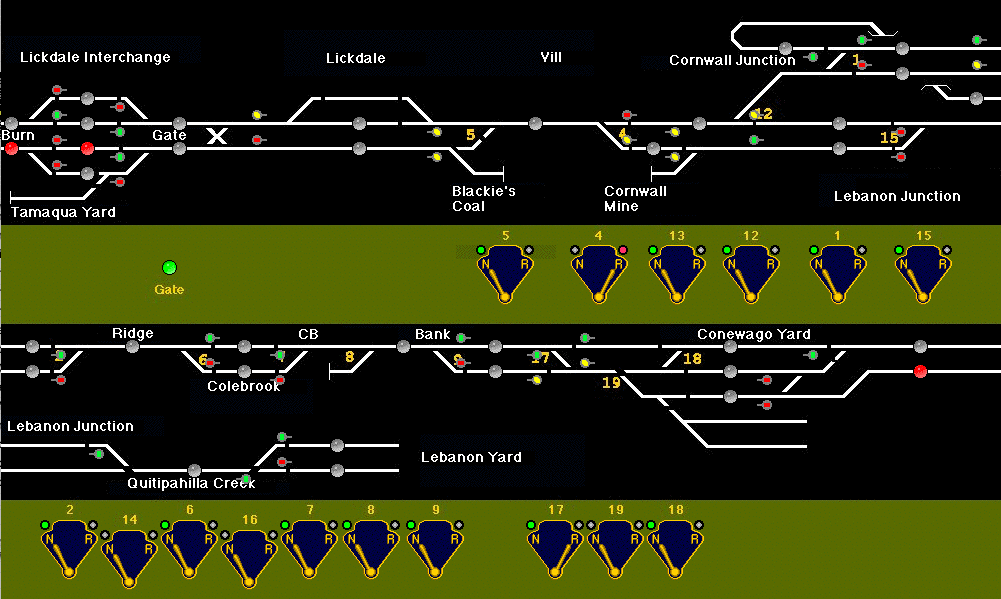
"lets you graphically draw a Panel exactly the way you want it,
and then animate parts of it to show the status of your layout and let you click to control it."
- graphical control panels
- as many panels as you like
- can be used to control the railroad
- flexibility over appearance
- supports warrants and automatic running
- modular layouts
- complicated panels for large layouts
JMRI panel tutorial - Part 2
Control Panel Editor "works like Panel Editor but provides an alternative interface.": menus, drag and drop
Layout Editor 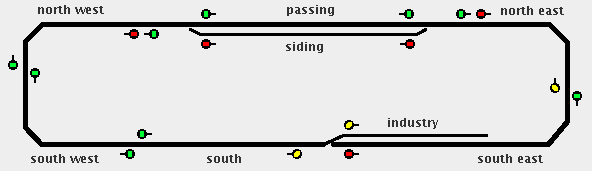
"provides tools to make a smart schematic of your layout while constructing the logic for signals, etc.
This constrains how the panel appears a little, but it can save significant time when first bringing your layout up."
- logical description of the layout
- only for a single layout
- designed for automation and semi-automation
- can directly control turnouts and signals
- needed by other jmri tools
JMRI panel tutorial - Part 1
Switchboard Editor 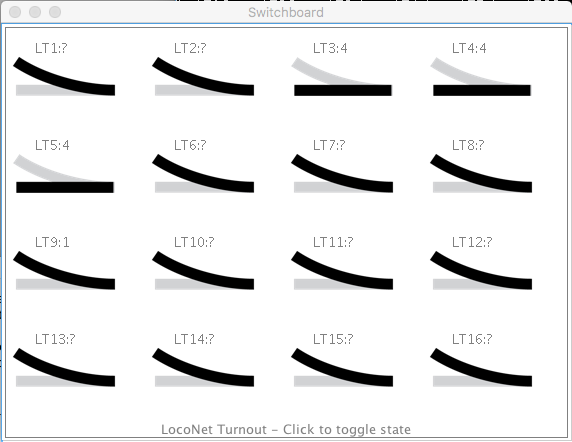
"is a graphic, straightforward control interface, showing a range of switch keys to watch and control items."
- basic inputs: sensors
- basic outputs: turnouts, lights
Aquesta taula continua cap a la dreta — desplaça-la o gira el mòbil.
-
- Passos / Steps
- Launch PanelPro
- Or, from DecoderPro: File->Open PanelPro Window
- Create items with the following names (from Tables, or
directly before adding items to the panel):
-
system name
user name
prefix
type
address
- X: Z21XpressNet
- L: Z21LocoNet
- N: NCE
- I: Internal
- T: turnout, output in signal mast
- S: sensor
- L: light
- H: signal head
- B: block
- Y: section
- Z: transit
- AL: audio listener
- AB: audio buffer
<integer>
(free)
Aquesta taula continua cap a la dreta — desplaça-la o gira el mòbil.
-
- Panels -> New Panel -> [Panel Editor, Control Panel Editor, Layout Editor, Switchboard Editor]
- Launch PanelPro
- Tutorials
- QUAKER
VALLEY
Railroad - JMRI Panel Tutorial (2015)
- jmri-tutorial
(GitLab)
- ...

- ...
- jmri-tutorial
(GitLab)
- QUAKER
VALLEY
Railroad - JMRI Panel Tutorial (2015)
- Part
1 - Focusing on the Layout Editor
(pdf)
(xml)
- 1.1 Background
- 1.2 Layout Editor
- 1.3 Panel Editor
- 1.4 Getting
Started
- Connection1 (Edit -> Preferences)
- System Manufacturer: NCE
- System connection: Simulator
- Download gif files:
mkdir ~/.jmri/panels && cd
                                  ~/.jmri/panels
wget http://quaker-valley.com/CTC/sampleCTC.gifwget http://quaker-valley.com/CTC/QV_CTC.gif
- Connection1 (Edit -> Preferences)
- 1.5 JMRI
Tables
- 1.5.1 Turnout
Table
- type
- internal turnouts (IT): represent parts of your panel
- connected to hardware turnouts (NT, XT, LT...)
- Tools -> Tables -> Turnouts
- Add: NT1, NT2, NT3, NT4, IT5
- type
- 1.5.2 Sensor
Table
- type:
- internal sensors (IS)
- connected to hardware sensors (NS,...): block detectors, push buttons, toggle switches
- Tools -> Tables -> Sensors
- Add: IS801 (BLOCK 801) - IS806 (BLOCK 806), IS901 (INTERLOCK 1) - IS904 (INTERLOCK 4)
- type:
- 1.5.1 Turnout
Table
- 1.6 Layout
Editor Development
- Panels -> New Panel -> Layout Editor
- Options
- Grid Options
- Show Grid in Edit Mode
- Snap to Grid when Adding
- Grid Options
- Put all turnouts on grid (shift + click)
- Turnout: LH, Name: Turnout 1 (top left), Rotate: 180
- Turnout: RH, Name: Turnout 2 (bottom left), Rotate: 180
- Turnout: LH, Name: Turnout 3 (bottom right)
- Turnout: RH, Name: Turnout 4 (top right)
- Turnout: LH, Name: Turnout 5 (bottom centre)
- Options
- Panels -> New Panel -> Layout Editor
- 1.7 Adding
Track
- Adding track (hold shift + click start over an
anchor point + move to another anchor point +
release):
- seccions superior i inferior / top and bottom
sections:
- Track: Track Segment, Mainline
- secció esquerra / left section:
- Track nodes: Anchor Point
- Track: Track Segment, Mainline
- left click on central circle: Change to: circle; Flipped
- Track: Track Segment, Mainline
- left click on central circle: Change to: circle; Flipped
- secció dreta / right section:
- Track: Track Segment, Mainline
- left click on central circle: Change to: circle
- via morta / dead end:
- Track nodes: End Bumper
- Track: Track Segment
- internal left
- Track: Track Segment
- left click on central circle: Change to: circle
- internal right
- Track Nodes: Anchor Point
- Track: Track Segment
- titles:
- Label: Label Text
- Options: disable Edit Mode
- Options: Save Location and Size
- Turnout are now functional
- seccions superior i inferior / top and bottom
sections:
- Adding track (hold shift + click start over an
anchor point + move to another anchor point +
release):
- 1.8 SAVE
your work
- Panels -> Store Panels: JMRI Layout Panel
- Part
2 - Developing a CTC Panel with Panel Editor
(pdf) (xml)
-
Layout Panel Panel Editor element block nivell / level
elements
Select the type of icon to Add to Panel System name / User name Change Icon... Logix
Logix
- Select from: Program Directory / icons /...
- drag to one of the status
detectors
Sensor - NS801 / Detector 801
- NS802 / Detector 802
- NS803 / Detector 803
- NS804 / Detector 804
- NS805 / Detector 805
- NS806 / Detector 806
- USS / plate / levers
- Active: switch-on

- Inactive: switch-off

- Unknown: switch-unknown

- Inconsistent: switch-inconsistent

- Active: switch-on
Levers simulate presence sensors
Logix
Conditional
Name
State Variable (if)
Action (then)
IX801 / Block 801
IX801C1 / Block 801 Occupied
- Sensor "NS801" state is "Sensor
Active"
- On Change To True, Set Sensor,
"IS801" to Active

- On Change To True, Play Sound File from file, ...toggle-on.wav
IX801C2 / Block 801 Unoccupied - Sensor "NS801" state is "Sensor
Inactive"
- On Change to True, Delayed Set
Sensor, "IS801" to Inactive
 ,
after 5 seconds
,
after 5 seconds - On Change to True, Play Sound from File, ...toggle-of.wav
IX802 IX802C1
IX802C2
IX803 IX803C1
IX803C2
IX804 IX804C1
IX804C2
IX805 IX805C1
IX805C2
IX806 IX806C1
IX806C2
Aquesta taula continua cap a la dreta — desplaça-la o gira el mòbil.
- top segment track
- 2 external left segment tracks
- internal left segment track
- 2 bottom segment tracks; turnout NT5
- external right segment track
- 3 internal right segment tracks
- Block 801
- Block 802
- Block 803
- Block 804
- Block 805
- Block 806
10 block sensors
Sensor
- IS801 / BLOCK 801 (extrem / end x2)
- IS802 / BLOCK 802 (Weston principal / main)
- IS803 / BLOCK 803 (Weston secundari / siding)
- IS804 / BLOCK 804 (yard turnout x2)
- IS805 / BLOCK 805 (Eastville principal / main)
- IS806 / BLOCK 806 (Eastville secundari / siding)
- smallschematics / LEDs
- Active: yellow
- Inactive: gray
- Unknown: red

- Inconsistent: red
- Active: yellow
Presence sensors and turnout status set the interlock sensors
Logix
Conditional
Name
State Variable
Action
IX901 / Interlock 901
IX901C1 / Turnout Normal Occupied
- R1: Sensor "IS801"
state is "Sensor Active"
- R2: Sensor "IS802"
state is "Sensor Active"
- R3: Turnout "NT1" state is "Turnout Closed"
- On Change To True, Set Sensor,
"IS901" to Active
IX901C2 / Turnout Normal Unoccupied - (R1 or R2) and R3
- R1: Sensor "IS801"
state is "Sensor Inactive"
- R2: Sensor "IS802"
state is "Sensor Inactive"
- R3: Turnout "NT1" state is "Turnout Closed"
- On Change To True, Delayed Set
Sensor, "IS901" to Inactive ,
after 5 seconds
IX901C3 / Turnout Reverse Occupied - R1: Sensor "IS801"
state is "Sensor Active"
- R2: Sensor "IS803"
state is "Sensor Active"
- R3: Turnout "NT1" state is "Turnout Thrown"
- On Change To True, Set Sensor,
"IS901" to Active
IX901C4 / Turnout Reverse Unoccupied - (R1 or R2) and R3
- R1: Sensor "IS801"
state is "Sensor Inactive"
- R2: Sensor "IS803"
state is "Sensor Inctive"
- R3: Turnout "NT1" state is "Turnout Thrown"
- On Change To True, Delayed Set
Sensor, "IS901" to Inactive ,
after 5 seconds
Aquesta taula continua cap a la dreta — desplaça-la o gira el mòbil.
- NT1 / Turnout 1
- NT2 / Turnout 2
- NT3 / Turnout 3
- NT4 / Turnout 4
- Block 901
- Block 902
- Block 903
- Block 904
interlock sensors
Sensor
- IS901 / INTERLOCK 1
- IS902 / INTERLOCK 2
- IS903 / INTERLOCK 3
- IS904 / INTERLOCK 4
- smallschematics / LEDs
- Active: red
- Inactive: gray
- Unknown: ?
- Inconsistent: ?
- Active: red
10 turnout lamps (on left)
Right Hand Turnout
- NT1 / Turnout 1
- NT2 / Turnout 2
- NT3 / Turnout 3
- NT4 / Turnout 4
- USS / sensor
- Closed (recte): green-on

- Thrown (desviat): green-off

- Unknown: s-unknown

- Inconsistent: s-inconsistent

- Closed (recte): green-on
Levers and code buttons control turnouts (and associated green/amber lamps)
Logix
Conditional
Name
State Variable
Action
IX03 / Turnout Lever 3 IX03C1 / Lever Normal (recte)
- R1: Sensor "Turnout Lever 3" state
is "Sensor Inactive"

- AND R2: Sensor "Code Button 4"
state is "Sensor Active"

- AND R3: Sensor "IS901"
state is "Sensor Inactive"
- On Change to True, Set Turnout, "NT1" to Closed
IX03C2 / Lever Reverse (desviat) - R1: Sensor "Turnout Lever 3" state
is "Sensor Active"

- AND R2: Sensor "Code Button 4"
state is "Sensor Active"
- AND R3: Sensor "IS901"
state is "Sensor Inactive"
- On Change to True, Set Turnout, "NT1" to Thrown
IX05 / Turnout Lever 5 IX05C1
- R1: Sensor "Turnout Lever 5" state
is "Sensor Inactive"
- AND R2: Sensor "Code Button 6"
state is "Sensor Active"
- AND R3: Sensor "IS902"
state is "Sensor Inactive"
- On Change to True, Set Turnout, "NT2" to Closed
IX05C2 - R1: Sensor "Turnout Lever 5" state
is "Sensor Active"
- AND R2: Sensor "Code Button 6"
state is "Sensor Active"
- AND R3: Sensor "IS902"
state is "Sensor Inactive"
- On Change to True, Set Turnout, "NT2" to Thrown
IX09 / Turnout Lever 9 IX09C1 - R1: Sensor "Turnout Lever 9" state
is "Sensor Inactive"
- AND R2: Sensor "Code Button 10"
state is "Sensor Active"
- AND R3: Sensor "IS903"
state is "Sensor Inactive"
- On Change to True, Set Turnout, "NT3" to Closed
IX09C2 - R1: Sensor "Turnout Lever 9" state
is "Sensor Active"
- AND R2: Sensor "Code Button 10"
state is "Sensor Active"
- AND R3: Sensor "IS903"
state is "Sensor Inactive"
- On Change to True, Set Turnout, "NT3" to Thrown
IX11 / Turnout Lever 11 IX11C1 - R1: Sensor "Turnout Lever 11"
state is "Sensor Inactive"
- AND R2: Sensor "Code Button 12"
state is "Sensor Active"
- AND R3: Sensor "IS904"
state is "Sensor Inactive"
- On Change to True, Set Turnout, "NT4" to Closed
IX11C2 - R1: Sensor "Turnout Lever 11"
state is "Sensor Active"
- AND R2: Sensor "Code Button 12"
state is "Sensor Active"
- AND R3: Sensor "IS904"
state is "Sensor Inactive"
- On Change to True, Set Turnout, "NT4" to Thrown
Aquesta taula continua cap a la dreta — desplaça-la o gira el mòbil.
10 turnout lamps (on right)
- USS / sensor
- Closed (recte): amber-off

- Thrown (desviat): amber-on

- Unknown: s-unknown
- Inconsistent: s-inconsistent
- Closed (recte): amber-off
10
levers (over turnout plate)
Sensor
- IS03 / Turnout Lever 3
- IS05 / Turnout Lever 5
- IS09 / Turnout Lever 9
- IS11 / Turnout Lever 11
- USS / plate / levers
- Active: I-right
- Inactive: I-left
- Unknown: I-unknown

- Inconsistent: I-inconsistent

- Active: I-right
10
code buttons (over signal plate)
Sensor
- IS04 / Code Button 4
- IS06 / Code Button 6
- IS10 / Code Button 10
- IS12 / Code Button 12
- USS / plate / levers
- Active: code-press
- Inactive: code

- Unknown: code-unknown

- Inconsistent: code-inconsistent

- Active: code-press
text
tracks (static) Icon
- USS / track / turnout / left / east:
east-l

- USS / track / turnout / right / west:
west-r

- USS / track / block: block

plates (static)
Icon
- USS / plate / numbered-plates / turnout

- sw-3: (77,337)
- sw-5: (142,337)
- sw-9: (272,337)
- sw-11: (337,337)
- USS / plate / numbered-plates / signal

- si-4: (77,435)
- si-6: (142,435)
- si-10: (272,435)
- si-12: (337,435)
- USS / plate / base-plates / misc

2
backgorund icons (static)
Icon
- USS / background



- Panel-left-7
- Panel-blank-7: (12,0)
- Panel-blank-7: (77,0)
- Panel-blank-7: (142,0)
- Panel-blank-7: (207,0)
- Panel-blank-7: (272,0)
- Panel-blank-7: (337,0)
- Panel-blank-7: (402,0)
- Panel-right-7: (467,0)
1
Aquesta taula continua cap a la dreta — desplaça-la o gira el mòbil.
- To add an icon to the Panel Editor:
- Select the type of icon to Add to Panel
- Change Icon...
- Icon: 1 icon
- Sensor: 4 icons
- Right Hand Turnout: 4 icons
- ...
- Add to Panel
- 2.1 Panel
Editor Development
- create a new panel
- Panels -> New Panel -> Panel Editor
- create a new panel
- 2.2 Adding
Turnout and Signal Plates
- 2.3 Adding
Turnout Levers and Code Buttons
- "The turnout or switch lever is an internal sensor that through the Logix controls the railroad turnouts."
- 2.4 Adding Turnout Lever Logix
- 2.5 The
CTC Panel Track Diagram
- Panel -> Edit -> Open Editor
- add tracks (static) to Panel Editor
- Select
the type to Add to Panel: Left HandTurnout
- NT1 -> Add to Panel
- Select the type to Add to Panel: Icon
- Change Icon...
- View on: Dark Gray
- Program Directory / icons / USS / track /
turnout / left / east
- drag east-l to Icon
- Add to Panel (twice)
- Program Directory / icons / USS / track /
turnout / ritgh / west
- drag west-r to Icon
- Add to Panel (twice)
- Program Directory / icons / USS / track /
block
- drag block (left-click over draw, not text) to Icon
- Add to Panel (15 times)
- drag "b-45-dark" to Icon
- Add to Panel (Rotate 90 degrees)
- Select
the type to Add to Panel: Left HandTurnout
- add text to Panel Editor:
- Add text
- "WESTON", Font -> Font Size: 16, Font -> Font Color: Yellow
- "EASTVILLE", Font -> Font Size: 16, Font -> Font Color: Yellow
- "3", Font -> Font Size: 16, Font -> Font Color: Yellow
- "5", Font -> Font Size: 16, Font -> Font Color: Yellow
- "9", Font -> Font Size: 16, Font -> Font Color: Yellow
- "11", Font -> Font Size: 16, Font -> Font Color: Yellow
- Add text
- add block sensors to Panel Editor
- IS801, IS802, IS803, IS804, IS805
- 2.5.1 Activating
the
Block Sensors
- ...
- 2.6 Adding Block Detection to the Layout Panel
- Options -> Edit
- Add block 801:
- Tables -> Blocks
- Add...
- System Name: 801
- User Name: Block 801
- Sensor: BLOCK 801 (IS801)
- Add...
- Tables -> Blocks
- Associate Block 801 to Main track
-
Block Sensor Occupied Track Color Layout Panel Block 801 BLOCK 801 / IS801 Red - top segment track
Block 802 BLOCK 802 / IS802 Red - 2 external left segment tracks
Block 803 BLOCK 803 / IS803 Orange - internal left segment track
Block 804 BLOCK 804 / IS804 Red - 2 bottom segment tracks
- turnout 5
Block 805 BLOCK 805 / IS805 Red - external right segment track
Block 806 BLOCK 806 / IS806 Orange - 3 internal right segment tracks
Block 901 INTERLOCK 1 / IS901 Red - turnout 1 / NT1
Block 902 INTERLOCK 2 / IS902 Red - turnout 2 / NT2
Block 903 INTERLOCK 3 / IS903 Red - turnout 3 / NT3
Block 904 INTERLOCK 4 / IS904 Red - turnout 4 / NT4
Aquesta taula continua cap a la dreta — desplaça-la o gira el mòbil.
- ...
- 2.7 Panel Startup Route
- Tools->Tables -> Sensor: IS999 / RESET
- Tools->Tables->Routes:R999
- Turnouts:
- NTx / Turnout x: Include, SetClosed
- Sensors:
- ISxx / Turnout lever x: Include, SetInactive
- ISxx / Code Button x: Include, SetInactive
- NS80x / Detector 80x: Include, SetInactive
- Sensors that trigger this Route:
- RESET, On Active
- Turnouts:
- Panel Editor: add RESET sensor
- ...
- ...
-
- Part 3 - Adding Signals
and Simple Signal Logic (pdf) (xml)
-
Table -> Signal Heads Set Signals... Edit Logic...
Protects Sensors Red when Turnout... Protects Signal NT1 IH4EU / Signal 4 East Upper Throat - Continuing
IH4EL / Signal 4 East Lower Throat - Diverging
IH4WM / Signal 4 West Main Continuing
IH4WS / Signal 4 West Siding Diverging
NT2 IH6WU / Signal 6 West Upper Throat - Continuing
IH6WL / Signal 6 West Lower Throat - Diverging
IH6EM / Signal 6 East Main Continuing Main Leg of Turnout - BLOCK 804
- INTERLOCK 2
Turnout 2 state is Thrown - Signal 10 East Upper
- Signal 10 East Lower
IH6ES / Signal 6 East Siding Diverging Diverging Leg of Turnout - BLOCK 804
- INTERLOCK 2
Turnout 2 state is Closed - Signal 10 East Upper
- Signal 10 East Lower
NT3 IH10EU / Signal 10 East Upper Throat - Continuing
IH10EL / Signal 10 East Lower Throat - Diverging
IH10WM / Signal 10 West Main Continuing
IH10WS / Signal 10 West Siding Diverging
NT4 IH12WU / Signal 12 West Upper Throat - Continuing
IH12WL / Signal 12 West Lower Throat - Diverging
IH12EM / Signal 12 East Main Continuing
IH12ES / Signal 12 East Siding Diverging
Aquesta taula continua cap a la dreta — desplaça-la o gira el mòbil.
- 3.1 Adding Signals to the Layout Panel
- Tables -> Signals -> Signal Heads
- signals near turnout 3 (Virtual)
- IH4EU, Signal 4 East Upper
- IH4EL, Signal 4 East Lower
- IH4WM, Signal 4 West Main
- IH4WS, Signal 4 West Siding
- signals near turnout 3 (Virtual)
- ...
- Tables -> Signals -> Signal Heads
-
- ...
- Desviaments / Turnouts
- z21 (blanca/white)
- cal una versió de JMRI que arregli els problemes amb «z21 turnout timeout» / you need a version of JMRI which solves problems with "z21 turnout timeout"
- PanelPro / Tools / Tables /Turnouts: afegiu desviaments Z21XpressNet / add Z21XpressNet turnouts
- quan feu servir per primera vegada un desviament Z21XpressNet, automàticament es crea el seu corresponent desviament Z21LocoNet / when an XPressNet turnout is used, the corresponding Z21LocoNet turnout is automatically created
- haureu d'invertir els desviaments Z21XpressNet, perquè l'estat sigui consistent amb la realitat i amb l'estat donat pel clon de tipus Z21LocoNet (creat automàticament) / you need to invert Z21XpressNet turnouts in order to have consistent status with reality and Z21LocoNet clone (automatically created)
- z21 (blanca/white)
- Senyalització / Signaling
- JMRI:
Signaling
- Vocabulari / Vocabulary
- Un signal mast amb driver "Signal Head Controlled Mast" està composat de diversos signal head (cadascun pot estar en un appearance concret).
- Aspect: cadascuna de les combinacions dels signals heads que hi ha en un signal mast.
- Indication (rule): significat d'un aspecte.
- JMRI:
Signaling Quickstart
- Start to use JMRI Signaling in 7 steps
- Magic SignalMan Set Up
- JMRI:
Signal
Heads
- es fa servir conjuntament amb el mast driver / to be used with mast driver: Signal Head Controlled Mast
- The Signal Head Table
- Adding & Editing Signal Heads
- JMRI:
Signal
Masts
- The
Signal
Mast Table
- Adding Signal Masts
- Signal System:
- (propi) Adif
- ...
- Mast Driver
- DCC Signal Mast Decoder: fa servir paquets Extended Accessory
- The
Signal
Mast Table
- JMRI: Aspect Signaling
- JMRI: Signal Groups
- JMRI: Signal Mast Logic
- Vocabulari / Vocabulary
- JMRI:
Defining Your Own Signaling System
- francesc.pinyol.m / jmri-signals
- index.shtml - Free-form description of the signal system
- aspects.xml - Define the complete set of available aspects
- appearance-*.xml - One file for each type of
SignalMast, defining how to display each aspect (defined
by aspects.xml)
- E.g. ADIF signals created from signals.py (fpm):
- appearance-SL_4A_high.xml
- appearance-SL_4B_high.xml
- appearance-SL_3C_high.xml
- appearance-SL_3D_high.xml
- appearance-SL_2E_high.xml
- appearance-SL_2G_high.xml
- appearance-SL_2F_high.xml
- appearance-SL_2I_low.xml
- appearance-SL_2H_low.xml
- appearance-SL_2J_low.xml
- E.g. ADIF signals created from signals.py (fpm):
- Validation
- PanelPro -> Debug -> Validate XML File
- Use xmlstarlet
xmlstarlet val -s http://jmri.org/xml/schema/aspecttable.xsd
-e
                                  aspects.xml
xmlstarlet val -s http://jmri.org/xml/schema/appearancetable.xsd -e appearance...xml
- xml -> html (no need to create them, as xml will be
rendered as html when accessing them through an http server, which makes use of
xml/XSLT/ translation files)
xmlstarlet tr ~/src/JMRI/xml/XSLT/aspecttable.xsl aspects.xml >aspects.html- ...
- nginx
conf to render xml files:
- /etc/nginx/default.conf
server {}
listen 80;
server_name _;
location /jmri {
alias /disc/src/JMRI;
autoindex on;
}
- http://127.0.0.1/jmri/xml/signals/
- /etc/nginx/default.conf
- Estructura de fitxers / File structure
- resources/icons/<smallschematics|largeschematics>/aspects/<system_name>-<system_year>/
- index.php
- <CPL|PL|SE|SL|>-<number_signal_heads>-<high|low>-<abs|pbs>/
- index.php
- rule-<rule_number>.<gif|png|jpeg>
- xml/signals/<system_name>/
- appearance-<CPL|PL|SE|SL|>_<number_signal_heads>_<high|low>_<abs|pbs>.xml
(sample-appearance.xml)
- CPL: Color Position Light
PL: Position Light
SE: Semaphore
SL: Searchlight - abs: absolute
pbs: permissive - content
- <aspectname>
- <show>
- ...
- <reference>
- ...
- <imagelink type="small">../../../resources/icons/smallschematics/aspects/...
- <imagelink type="large">../../../resources/icons/largeschematics/aspects/...
- CPL: Color Position Light
- aspects.xml (sample-aspects.xml)
-
aspect
name indication rule
speed
speed2
route
dccAspect
Adif
(signalSpeeds.xml)
Clear
Proceed
Normal
Normal
Vía libre
VL
FF1A
Approach Limited
Proceed approaching next signal at limited speed.
Proceed prepared to pass next signal not exceeding 60 MPH and be prepared to enter diverging route at prescribed speed.
Advance Approach
Proceed preparing to stop at the second signal
Proceed prepared to pass next signal not exceeding 50 MPH and be prepared to enter diverging route at prescribed speed.
Approach Diverging
Approach Medium
Proceed prepared to pass next signal not exceeding 40 MPH and be prepared to enter diverging route at prescribed speed.
Approach Medium (Diverging)
Proceed prepared to pass next signal not exceeding 40 MPH and be prepared to enter diverging route at prescribed speed.
Approach restricting
Proceed prepared to pass next signal at restricted speed.
Approach
Proceed prepared to stop at next signal.
Proceed prepared to stop at next signal, trains exceeding 30 MPH immediately reduce to that speed.
Medium
Medium
Diverging Clear
Proceed through diverging route
Proceed on diverging route not exceeding prescribed speed through turnout. (Prescribed speed is 60 MPH).
Medium Medium
Diverging approach medium
Diverging Approach
Proceed through diverging route preparing to stop at next signal
Limited
Limited
Restricting
Proceed at restricted speed.
Restricting (diverging)
Proceed at restricted speed.
Restricted proceed
Stop, then proceed at restricted speed.
Proceed
Rebase autorizado
RA'
FF8B,C
Caution
Anuncio de precaución
PR
FF3
Stop
Stop
Stop
Stop
Parada
P
FF7
Stop and proceed
Rebase autorizado
RA
FF8A
Unlit
Unlit
Stop Stop
Aquesta taula continua cap a la dreta — desplaça-la o gira el mòbil.
- appearance-<CPL|PL|SE|SL|>_<number_signal_heads>_<high|low>_<abs|pbs>.xml
(sample-appearance.xml)
- resources/icons/<smallschematics|largeschematics>/aspects/<system_name>-<system_year>/
- JMRI:
Signaling
- XML
- structure
-
layout-config jmriversion major
minor
test
modifier
sensors
- class
sensor
- inverted
systemName
userName
turnouts
- class
operations
operation
- name
- class
- interval
- maxtries
defaultclosedspeed
defaultthrownspeed
turnout
- feedback: DIRECT
- inverted: false
- automate: Off
systemName
userName
memories
- class
memory
- value
systemName
signalmasts
- class
signalgroups
- class
signalmastlogics
- class
logicDelay
blocks
- class
defaultspeed
block
- systemName
- length
- curve
systemName
userName
permissive
occupancysensor
path
- todir
- fromdir
- block
beansetting
- setting
turnout
- systemName
oblocks
- class
layoutblocks
- class
layoutblock
- systemName
- occupancysensor
- occupiedsense
- trackcolor
- occupiedcolor
- extracolor
systemName
userName
routes
- class
route
- userName
systemName
userName
routeOutputTurnout
- systemName
- state: CLOSED
routeOutputSensor
- systemName
- state: INACTIVE
warrants
- class
logixs
- class
logix
- userName
- enabled
systemName
userName
logixConditional
- systemName
- order: 0, 1, ...
conditionals
- class
conditional
- systemName
- userName
- antecedent
- logicType
- triggerOnChange
systemName
userName
conditionalStateVariable
- operator
- negated
- type
- systemName
- dataString
- num1
- num2
- triggersCalc
conditionalAction
- option
- type
- systemName
- data
- delay
- string
timebase
- class
- time
- rate
- startrate
- run
- master
- sync
- correct
- display
- startstopped
- startrunning
- startsettime
- startclockoption
- showbutton
- startsetrate
LayoutEditor
- class
- name
- x
- y
- ...
panelEditor
- class
- name
- x
- y
- height
- width
- editable
- positionable
- showtooltips
- controlling
- hide
- panelmenu
- scrollable
- redBackground
- greenBackground
- blueBackground
filehistory operation type
date
filaneme
Aquesta taula continua cap a la dreta — desplaça-la o gira el mòbil.
-
- structure
- ...
07OperationsPro#
...
http://www.francescpinyol.cat/jmri.html
Primera versió / First version: 24.V.2019
Darrera modificació: 25 d'octubre de 2025 / Last update: 25th
October 2025