
OpenSearch
Seccions d'aquesta pàgina 7
01General#
- OpenSearch
- Introduction to OpenSearch
-
OpenSearch Database index table document (JSON) row shard (each shard stores a subset of all documents in an index)
Aquesta taula continua cap a la dreta — desplaça-la o gira el mòbil.
- Index configured with:
-
- ...
- Introduction to OpenSearch
02Servidor / Server#
-
option previous steps
(system setup)custom-opensearch.yml
(sudo chown 1000:1000 custom-opensearch*.yml)docker-compose.yml
(docker compose up)verify 2 nodes + dashboards (demo certs) - set demo password
echo "OPENSEARCH_INITIAL_ADMIN_PASSWORD=xxxxxx"
                                >.env
docker-compose.yml
services:

                                opensearch-node1: # This is also the
                              hostname of the container within the Docker
                              network (i.e. https://opensearch-node1/)

                                  image:
                              opensearchproject/opensearch:latest

                                  container_name:
                              opensearch-node1

                                  environment:

                                    -
                              cluster.name=opensearch-cluster # Name the cluster

                                    -
                              node.name=opensearch-node1 # Name the node that
                              will run in this container

                                    -
                              discovery.seed_hosts=opensearch-node1,opensearch-node2
                              # Nodes to look for when discovering the cluster

                                    -
                              cluster.initial_cluster_manager_nodes=opensearch-node1,opensearch-node2
                              # Nodes eligibile to serve as cluster manager

                                    -
                              bootstrap.memory_lock=true # Disable JVM heap
                              memory swapping

                                    -
                              "OPENSEARCH_JAVA_OPTS=-Xms512m -Xmx512m" # Set min
                              and max JVM heap sizes to at least 50% of system
                              RAM

                                    - OPENSEARCH_INITIAL_ADMIN_PASSWORD=${OPENSEARCH_INITIAL_ADMIN_PASSWORD}
                              # Sets the demo admin user password when using
                              demo configuration (for OpenSearch 2.12 and later)

                                  ulimits:

                                    memlock:

                                      soft:
                              -1 # Set memlock to unlimited (no soft or hard
                              limit)

                                      hard:
                              -1

                                    nofile:

                                      soft:
                              65536 # Maximum number of open files for the
                              opensearch user - set to at least 65536

                                      hard:
                              65536

                                  volumes:

                                    -
                              opensearch-data1:/usr/share/opensearch/data #
                              Creates volume called opensearch-data1 and mounts
                              it to the container

                                  ports:

                                    - 9200:9200 # REST
                              API

                                    - 9600:9600 #
                              Performance Analyzer

                                  networks:

                                    - opensearch-net #
                              All of the containers will join the same Docker
                              bridge network

                                opensearch-node2:

                                  image:
                              opensearchproject/opensearch:latest # This should
                              be the same image used for opensearch-node1 to
                              avoid issues

                                  container_name:
                              opensearch-node2

                                  environment:

                                    -
                              cluster.name=opensearch-cluster

                                    -
                              node.name=opensearch-node2

                                    -
                              discovery.seed_hosts=opensearch-node1,opensearch-node2

                                    -
                              cluster.initial_cluster_manager_nodes=opensearch-node1,opensearch-node2

                                    -
                              bootstrap.memory_lock=true

                                    -
                              "OPENSEARCH_JAVA_OPTS=-Xms512m -Xmx512m"

                                    -
                              OPENSEARCH_INITIAL_ADMIN_PASSWORD=${OPENSEARCH_INITIAL_ADMIN_PASSWORD}

                                  ulimits:

                                    memlock:

                                      soft:
                              -1

                                      hard:
                              -1

                                    nofile:

                                      soft:
                              65536

                                      hard:
                              65536

                                  volumes:

                                    -
                              opensearch-data2:/usr/share/opensearch/data

                                  networks:

                                    - opensearch-net

                                opensearch-dashboards:

                                  image:
                              opensearchproject/opensearch-dashboards:latest #
                              Make sure the version of opensearch-dashboards
                              matches the version of opensearch installed on
                              other nodes

                                  container_name:
                              opensearch-dashboards

                                  ports:

                                    - 5601:5601 # Map
                              host port 5601 to container port 5601

                                  expose:

                                    - "5601" # Expose
                              port 5601 for web access to OpenSearch Dashboards

                                  environment:

                                    OPENSEARCH_HOSTS:
                              '["https://opensearch-node1:9200","https://opensearch-node2:9200"]'
                              # Define the OpenSearch nodes that OpenSearch
                              Dashboards will query

                                  networks:

                                    - opensearch-net

                              volumes:

                                opensearch-data1:

                                opensearch-data2:

                              networks:

                                opensearch-net:
curl https://localhost:9200 -ku admin:xxxxxx- http://localhost:5601/
- admin / xxxxxx
2 nodes + dashboards (own certs) - generate certificates (for: root, node1, node2, admin user)
- Sample script to generate self-signed PEM certificates
sudo chown 1000:1000 root-ca.pem admin.pem
                                admin-key.pem node1.pem
node1-key.pem
node2.pem node2-key.pemsudo chmod 0600 root-ca.pem admin.pem admin-key.pem node1.pem node1-key.pemnode2.pem node2-key.pem
custom-opensearch-node1.yml
---

                              cluster.name: docker-cluster

                              # Bind to all interfaces because we don't know
                              what IP address Docker will assign to us.

                              network.host: 0.0.0.0

                              # # minimum_master_nodes need to be explicitly set
                              when bound on a public IP

                              # # set to 1 to allow single node clusters

                              # discovery.zen.minimum_master_nodes: 1


                              # Setting network.host to a non-loopback address
                              enables the annoying bootstrap checks.
                              "Single-node" mode disables them again.

                              # discovery.type: single-node

                              plugins.security.ssl.transport.pemcert_filepath: node1.pem

                              plugins.security.ssl.transport.pemkey_filepath: node1-key.pem

                              plugins.security.ssl.transport.pemtrustedcas_filepath:
                              root-ca.pem

                              plugins.security.ssl.transport.enforce_hostname_verification:
                              false

                              plugins.security.ssl.http.enabled: true

                              plugins.security.ssl.http.pemcert_filepath: node1.pem

                              plugins.security.ssl.http.pemkey_filepath: node1-key.pem

                              plugins.security.ssl.http.pemtrustedcas_filepath:
                              root-ca.pem

                              plugins.security.allow_unsafe_democertificates:
                              true

                              plugins.security.allow_default_init_securityindex:
                              true

                              plugins.security.authcz.admin_dn:

                                -
                              CN=A,OU=UNIT,O=ORG,L=TORONTO,ST=ONTARIO,C=CA

                              plugins.security.nodes_dn:

                                -
                              "CN=node1.dns.a-record,OU=UNIT,O=ORG,L=TORONTO,ST=ONTARIO,C=CA"

                                -
                              "CN=node2.dns.a-record,OU=UNIT,O=ORG,L=TORONTO,ST=ONTARIO,C=CA"

                              plugins.security.audit.type: internal_opensearch

                              plugins.security.enable_snapshot_restore_privilege:
                              true

                              plugins.security.check_snapshot_restore_write_privileges:
                              true

                              plugins.security.restapi.roles_enabled:
                              ["all_access", "security_rest_api_access"]

                              #cluster.routing.allocation.disk.threshold_enabled:
                              false

                              #opendistro_security.audit.config.disabled_rest_categories:
                              NONE

                              #opendistro_security.audit.config.disabled_transport_categories:
                              NONE


                              plugins.security.system_indices.enabled: true

                              plugins.security.system_indices.indices:
                              [.plugins-ml-agent, .plugins-ml-config,
                              .plugins-ml-connector, .plugins-ml-controller,
                              .plugins-ml-model-group, .plugins-ml-model,
                              .plugins-ml-task, .plugins-ml-conversation-meta,
                              .plugins-ml-conversation-interactions,
                              .plugins-ml-memory-meta,
                              .plugins-ml-memory-message,
                              .plugins-ml-stop-words,
                              .opendistro-alerting-config,
                              .opendistro-alerting-alert*,
                              .opendistro-anomaly-results*,
                              .opendistro-anomaly-detector*,
                              .opendistro-anomaly-checkpoints,
                              .opendistro-anomaly-detection-state,
                              .opendistro-reports-*,
                              .opensearch-notifications-*,
                              .opensearch-notebooks, .opensearch-observability,
                              .ql-datasources,
                              .opendistro-asynchronous-search-response*,
                              .replication-metadata-store,
                              .opensearch-knn-models, .geospatial-ip2geo-data*,
                              .plugins-flow-framework-config,
                              .plugins-flow-framework-templates,
                              .plugins-flow-framework-state]

                              node.max_local_storage_nodes: 3
---

                              cluster.name: docker-cluster

                              # Bind to all interfaces because we don't know
                              what IP address Docker will assign to us.

                              network.host: 0.0.0.0

                              # # minimum_master_nodes need to be explicitly set
                              when bound on a public IP

                              # # set to 1 to allow single node clusters

                              # discovery.zen.minimum_master_nodes: 1


                              # Setting network.host to a non-loopback address
                              enables the annoying bootstrap checks.
                              "Single-node" mode disables them again.

                              # discovery.type: single-node

                              plugins.security.ssl.transport.pemcert_filepath: node2.pem

                              plugins.security.ssl.transport.pemkey_filepath: node2-key.pem

                              plugins.security.ssl.transport.pemtrustedcas_filepath:
                              root-ca.pem

                              plugins.security.ssl.transport.enforce_hostname_verification:
                              false

                              plugins.security.ssl.http.enabled: true

                              plugins.security.ssl.http.pemcert_filepath: node2.pem

                              plugins.security.ssl.http.pemkey_filepath: node2-key.pem

                              plugins.security.ssl.http.pemtrustedcas_filepath:
                              root-ca.pem

                              plugins.security.allow_unsafe_democertificates:
                              true

                              plugins.security.allow_default_init_securityindex:
                              true

                              plugins.security.authcz.admin_dn:

                                -
                              CN=A,OU=UNIT,O=ORG,L=TORONTO,ST=ONTARIO,C=CA

                              plugins.security.nodes_dn:

                                -
                              "CN=node1.dns.a-record,OU=UNIT,O=ORG,L=TORONTO,ST=ONTARIO,C=CA"

                                -
                              "CN=node2.dns.a-record,OU=UNIT,O=ORG,L=TORONTO,ST=ONTARIO,C=CA"

                              plugins.security.audit.type: internal_opensearch

                              plugins.security.enable_snapshot_restore_privilege:
                              true

                              plugins.security.check_snapshot_restore_write_privileges:
                              true

                              plugins.security.restapi.roles_enabled:
                              ["all_access", "security_rest_api_access"]

                              #cluster.routing.allocation.disk.threshold_enabled:
                              false

                              #opendistro_security.audit.config.disabled_rest_categories:
                              NONE

                              #opendistro_security.audit.config.disabled_transport_categories:
                              NONE


                              plugins.security.system_indices.enabled: true

                              plugins.security.system_indices.indices:
                              [.plugins-ml-agent, .plugins-ml-config,
                              .plugins-ml-connector, .plugins-ml-controller,
                              .plugins-ml-model-group, .plugins-ml-model,
                              .plugins-ml-task, .plugins-ml-conversation-meta,
                              .plugins-ml-conversation-interactions,
                              .plugins-ml-memory-meta,
                              .plugins-ml-memory-message,
                              .plugins-ml-stop-words,
                              .opendistro-alerting-config,
                              .opendistro-alerting-alert*,
                              .opendistro-anomaly-results*,
                              .opendistro-anomaly-detector*,
                              .opendistro-anomaly-checkpoints,
                              .opendistro-anomaly-detection-state,
                              .opendistro-reports-*,
                              .opensearch-notifications-*,
                              .opensearch-notebooks, .opensearch-observability,
                              .ql-datasources,
                              .opendistro-asynchronous-search-response*,
                              .replication-metadata-store,
                              .opensearch-knn-models, .geospatial-ip2geo-data*,
                              .plugins-flow-framework-config,
                              .plugins-flow-framework-templates,
                              .plugins-flow-framework-state]

                              node.max_local_storage_nodes: 3
docker-compose.yml
services:
opensearch-node1: # This is also the hostname of the container within the Docker network (i.e. https://opensearch-node1/)
image: opensearchproject/opensearch:latest
container_name: opensearch-node1
environment:
- cluster.name=opensearch-cluster # Name the cluster
- node.name=opensearch-node1 # Name the node that will run in this container
- discovery.seed_hosts=opensearch-node1,opensearch-node2 # Nodes to look for when discovering the cluster
- cluster.initial_cluster_manager_nodes=opensearch-node1,opensearch-node2 # Nodes eligibile to serve as cluster manager
- bootstrap.memory_lock=true # Disable JVM heap memory swapping
- "OPENSEARCH_JAVA_OPTS=-Xms512m -Xmx512m" # Set min and max JVM heap sizes to at least 50% of system RAM
#- OPENSEARCH_INITIAL_ADMIN_PASSWORD=${OPENSEARCH_INITIAL_ADMIN_PASSWORD} # Sets the demo admin user password when using demo configuration (for OpenSearch 2.12 and later)
- "DISABLE_INSTALL_DEMO_CONFIG=true" # Prevents execution of bundled demo script which installs demo certificates and security configurations to OpenSearch
#- "DISABLE_SECURITY_PLUGIN=true" # Disables Security plugin
ulimits:
memlock:
soft: -1 # Set memlock to unlimited (no soft or hard limit)
hard: -1
nofile:
soft: 65536 # Maximum number of open files for the opensearch user - set to at least 65536
hard: 65536
volumes:
- opensearch-data1:/usr/share/opensearch/data # Creates volume called opensearch-data1 and mounts it to the container
- ./root-ca.pem:/usr/share/opensearch/config/root-ca.pem
- ./admin.pem:/usr/share/opensearch/config/admin.pem
- ./admin-key.pem:/usr/share/opensearch/config/admin-key.pem
- ./node1.pem:/usr/share/opensearch/config/node1.pem
- ./node1-key.pem:/usr/share/opensearch/config/node1-key.pem
- ./custom-opensearch-node1.yml:/usr/share/opensearch/config/opensearch.yml
ports:
- 9200:9200 # REST API
- 9600:9600 # Performance Analyzer
networks:
- opensearch-net # All of the containers will join the same Docker bridge network
opensearch-node2:
image: opensearchproject/opensearch:latest # This should be the same image used for opensearch-node1 to avoid issues
container_name: opensearch-node2
environment:
- cluster.name=opensearch-cluster
- node.name=opensearch-node2
- discovery.seed_hosts=opensearch-node1,opensearch-node2
- cluster.initial_cluster_manager_nodes=opensearch-node1,opensearch-node2
- bootstrap.memory_lock=true
- "OPENSEARCH_JAVA_OPTS=-Xms512m -Xmx512m"
#- OPENSEARCH_INITIAL_ADMIN_PASSWORD=${OPENSEARCH_INITIAL_ADMIN_PASSWORD}
- "DISABLE_INSTALL_DEMO_CONFIG=true" # Prevents execution of bundled demo script which installs demo certificates and security configurations to OpenSearch
#- "DISABLE_SECURITY_PLUGIN=true" # Disables Security plugin
ulimits:
memlock:
soft: -1
hard: -1
nofile:
soft: 65536
hard: 65536
volumes:
- opensearch-data2:/usr/share/opensearch/data
- ./root-ca.pem:/usr/share/opensearch/config/root-ca.pem
- ./admin.pem:/usr/share/opensearch/config/admin.pem
- ./admin-key.pem:/usr/share/opensearch/config/admin-key.pem
- ./node2.pem:/usr/share/opensearch/config/node2.pem
- ./node2-key.pem:/usr/share/opensearch/config/node2-key.pem
- ./custom-opensearch-node2.yml:/usr/share/opensearch/config/opensearch.yml
networks:
- opensearch-net
opensearch-dashboards:
image: opensearchproject/opensearch-dashboards:latest # Make sure the version of opensearch-dashboards matches the version of opensearch installed on other nodes
container_name: opensearch-dashboards
ports:
- 5601:5601 # Map host port 5601 to container port 5601
expose:
- "5601" # Expose port 5601 for web access to OpenSearch Dashboards
environment:
OPENSEARCH_HOSTS: '["https://opensearch-node1:9200","https://opensearch-node2:9200"]' # Define the OpenSearch nodes that OpenSearch Dashboards will query
networks:
- opensearch-net
volumes:
opensearch-data1:
opensearch-data2:
networks:
opensearch-net:
sudo cp admin.pem admin.myuser.pem
sudo chown myuser:mygroupadmin.myuser.pem
sudo cp admin-key.pem admin-key.myuser.pem
sudo chown myuser:mygroupadmin-key.myuser.pem
curl -k --cert ./admin.myuser.pem --key ./admin-key.myuser.pem -X GET "https://localhost:9200"- create master user:
curl -k --cert ./admin.myuser.pem --key
                                ./admin-key.myuser.pem -H "Content-Type:
                                application/json" -X PUT
                                "https://localhost:9200/_plugins/_security/api/internalusers/master"
                                -d '{

                                  "password": "yyyyyy",

                                  "opendistro_security_roles":
                                ["all_access"],

                                  "backend_roles": []

}'- http://localhost:5601/
- master / yyyyyy
2 nodes with AWS S3 plugin + dashboards (own certs) - build custom image
- Dockerfile
FROM
                                  opensearchproject/opensearch:3.0.0


                                  ENV AWS_ACCESS_KEY_ID xxxxxx

                                  ENV AWS_SECRET_ACCESS_KEY yyyyyy


                                  # Optional

                                  #ENV AWS_SESSION_TOKEN
                                  <optional-session-token>


                                  RUN
                                  /usr/share/opensearch/bin/opensearch-plugin
                                  install --batch repository-s3

                                  RUN
                                  /usr/share/opensearch/bin/opensearch-keystore
                                  create


                                  RUN echo $AWS_ACCESS_KEY_ID |
                                  /usr/share/opensearch/bin/opensearch-keystore
                                  add --stdin s3.client.default.access_key

                                  RUN echo $AWS_SECRET_ACCESS_KEY |
                                  /usr/share/opensearch/bin/opensearch-keystore
                                  add --stdin s3.client.default.secret_key


                                  # Optional

                                  #RUN echo $AWS_SESSION_TOKEN |
                                  /usr/share/opensearch/bin/opensearch-keystore
                                  add --stdin s3.client.default.session_token
docker build --tag=opensearch-custom-plugin .- generate certificates (for: root, node1, node2, admin user)
custom-opensearch-node1.yml
---# aws s3
cluster.name: docker-cluster
# Bind to all interfaces because we don't know what IP address Docker will assign to us.
network.host: 0.0.0.0
# # minimum_master_nodes need to be explicitly set when bound on a public IP
# # set to 1 to allow single node clusters
# discovery.zen.minimum_master_nodes: 1
# Setting network.host to a non-loopback address enables the annoying bootstrap checks. "Single-node" mode disables them again.
# discovery.type: single-node
plugins.security.ssl.transport.pemcert_filepath: node1.pem
plugins.security.ssl.transport.pemkey_filepath: node1-key.pem
plugins.security.ssl.transport.pemtrustedcas_filepath: root-ca.pem
plugins.security.ssl.transport.enforce_hostname_verification: false
plugins.security.ssl.http.enabled: true
plugins.security.ssl.http.pemcert_filepath: node1.pem
plugins.security.ssl.http.pemkey_filepath: node1-key.pem
plugins.security.ssl.http.pemtrustedcas_filepath: root-ca.pem
plugins.security.allow_unsafe_democertificates: true
plugins.security.allow_default_init_securityindex: true
plugins.security.authcz.admin_dn:
- CN=A,OU=UNIT,O=ORG,L=TORONTO,ST=ONTARIO,C=CA
plugins.security.nodes_dn:
- "CN=node1.dns.a-record,OU=UNIT,O=ORG,L=TORONTO,ST=ONTARIO,C=CA"
- "CN=node2.dns.a-record,OU=UNIT,O=ORG,L=TORONTO,ST=ONTARIO,C=CA"
plugins.security.audit.type: internal_opensearch
plugins.security.enable_snapshot_restore_privilege: true
plugins.security.check_snapshot_restore_write_privileges: true
plugins.security.restapi.roles_enabled: ["all_access", "security_rest_api_access"]
#cluster.routing.allocation.disk.threshold_enabled: false
#opendistro_security.audit.config.disabled_rest_categories: NONE
#opendistro_security.audit.config.disabled_transport_categories: NONE
plugins.security.system_indices.enabled: true
plugins.security.system_indices.indices: [.plugins-ml-agent, .plugins-ml-config, .plugins-ml-connector, .plugins-ml-controller, .plugins-ml-model-group, .plugins-ml-model, .plugins-ml-task, .plugins-ml-conversation-meta, .plugins-ml-conversation-interactions, .plugins-ml-memory-meta, .plugins-ml-memory-message, .plugins-ml-stop-words, .opendistro-alerting-config, .opendistro-alerting-alert*, .opendistro-anomaly-results*, .opendistro-anomaly-detector*, .opendistro-anomaly-checkpoints, .opendistro-anomaly-detection-state, .opendistro-reports-*, .opensearch-notifications-*, .opensearch-notebooks, .opensearch-observability, .ql-datasources, .opendistro-asynchronous-search-response*, .replication-metadata-store, .opensearch-knn-models, .geospatial-ip2geo-data*, .plugins-flow-framework-config, .plugins-flow-framework-templates, .plugins-flow-framework-state]
node.max_local_storage_nodes: 3
s3.client.default.region: eu-west-1
---
cluster.name: docker-cluster
# Bind to all interfaces because we don't know what IP address Docker will assign to us.
network.host: 0.0.0.0
# # minimum_master_nodes need to be explicitly set when bound on a public IP
# # set to 1 to allow single node clusters
# discovery.zen.minimum_master_nodes: 1
# Setting network.host to a non-loopback address enables the annoying bootstrap checks. "Single-node" mode disables them again.
# discovery.type: single-node
plugins.security.ssl.transport.pemcert_filepath: node2.pem
plugins.security.ssl.transport.pemkey_filepath: node2-key.pem
plugins.security.ssl.transport.pemtrustedcas_filepath: root-ca.pem
plugins.security.ssl.transport.enforce_hostname_verification: false
plugins.security.ssl.http.enabled: true
plugins.security.ssl.http.pemcert_filepath: node2.pem
plugins.security.ssl.http.pemkey_filepath: node2-key.pem
plugins.security.ssl.http.pemtrustedcas_filepath: root-ca.pem
plugins.security.allow_unsafe_democertificates: true
plugins.security.allow_default_init_securityindex: true
plugins.security.authcz.admin_dn:
- CN=A,OU=UNIT,O=ORG,L=TORONTO,ST=ONTARIO,C=CA
plugins.security.nodes_dn:
- "CN=node1.dns.a-record,OU=UNIT,O=ORG,L=TORONTO,ST=ONTARIO,C=CA"
- "CN=node2.dns.a-record,OU=UNIT,O=ORG,L=TORONTO,ST=ONTARIO,C=CA"
plugins.security.audit.type: internal_opensearch
plugins.security.enable_snapshot_restore_privilege: true
plugins.security.check_snapshot_restore_write_privileges: true
plugins.security.restapi.roles_enabled: ["all_access", "security_rest_api_access"]
#cluster.routing.allocation.disk.threshold_enabled: false
#opendistro_security.audit.config.disabled_rest_categories: NONE
#opendistro_security.audit.config.disabled_transport_categories: NONE
plugins.security.system_indices.enabled: true
plugins.security.system_indices.indices: [.plugins-ml-agent, .plugins-ml-config, .plugins-ml-connector, .plugins-ml-controller, .plugins-ml-model-group, .plugins-ml-model, .plugins-ml-task, .plugins-ml-conversation-meta, .plugins-ml-conversation-interactions, .plugins-ml-memory-meta, .plugins-ml-memory-message, .plugins-ml-stop-words, .opendistro-alerting-config, .opendistro-alerting-alert*, .opendistro-anomaly-results*, .opendistro-anomaly-detector*, .opendistro-anomaly-checkpoints, .opendistro-anomaly-detection-state, .opendistro-reports-*, .opensearch-notifications-*, .opensearch-notebooks, .opensearch-observability, .ql-datasources, .opendistro-asynchronous-search-response*, .replication-metadata-store, .opensearch-knn-models, .geospatial-ip2geo-data*, .plugins-flow-framework-config, .plugins-flow-framework-templates, .plugins-flow-framework-state]
node.max_local_storage_nodes: 3
# aws s3
s3.client.default.region: eu-west-1
docker-compose.yml
services:
opensearch-node1: # This is also the hostname of the container within the Docker network (i.e. https://opensearch-node1/)
image: opensearch-custom-plugin:latest
container_name: opensearch-node1
environment:
- cluster.name=opensearch-cluster # Name the cluster
- node.name=opensearch-node1 # Name the node that will run in this container
- discovery.seed_hosts=opensearch-node1,opensearch-node2 # Nodes to look for when discovering the cluster
- cluster.initial_cluster_manager_nodes=opensearch-node1,opensearch-node2 # Nodes eligibile to serve as cluster manager
- bootstrap.memory_lock=true # Disable JVM heap memory swapping
- "OPENSEARCH_JAVA_OPTS=-Xms512m -Xmx512m" # Set min and max JVM heap sizes to at least 50% of system RAM
#- OPENSEARCH_INITIAL_ADMIN_PASSWORD=${OPENSEARCH_INITIAL_ADMIN_PASSWORD} # Sets the demo admin user password when using demo configuration (for OpenSearch 2.12 and later)
- "DISABLE_INSTALL_DEMO_CONFIG=true" # Prevents execution of bundled demo script which installs demo certificates and security configurations to OpenSearch
#- "DISABLE_SECURITY_PLUGIN=true" # Disables Security plugin
ulimits:
memlock:
soft: -1 # Set memlock to unlimited (no soft or hard limit)
hard: -1
nofile:
soft: 65536 # Maximum number of open files for the opensearch user - set to at least 65536
hard: 65536
volumes:
- opensearch-data1:/usr/share/opensearch/data # Creates volume called opensearch-data1 and mounts it to the container
- ./root-ca.pem:/usr/share/opensearch/config/root-ca.pem
- ./admin.pem:/usr/share/opensearch/config/admin.pem
- ./admin-key.pem:/usr/share/opensearch/config/admin-key.pem
- ./node1.pem:/usr/share/opensearch/config/node1.pem
- ./node1-key.pem:/usr/share/opensearch/config/node1-key.pem
- ./custom-opensearch-node1.yml:/usr/share/opensearch/config/opensearch.yml
ports:
- 9200:9200 # REST API
- 9600:9600 # Performance Analyzer
networks:
- opensearch-net # All of the containers will join the same Docker bridge network
opensearch-node2:
image:opensearch-custom-plugin:latest # This should be the same image used for opensearch-node1 to avoid issues
container_name: opensearch-node2
environment:
- cluster.name=opensearch-cluster
- node.name=opensearch-node2
- discovery.seed_hosts=opensearch-node1,opensearch-node2
- cluster.initial_cluster_manager_nodes=opensearch-node1,opensearch-node2
- bootstrap.memory_lock=true
- "OPENSEARCH_JAVA_OPTS=-Xms512m -Xmx512m"
#- OPENSEARCH_INITIAL_ADMIN_PASSWORD=${OPENSEARCH_INITIAL_ADMIN_PASSWORD}
- "DISABLE_INSTALL_DEMO_CONFIG=true" # Prevents execution of bundled demo script which installs demo certificates and security configurations to OpenSearch
#- "DISABLE_SECURITY_PLUGIN=true" # Disables Security plugin
ulimits:
memlock:
soft: -1
hard: -1
nofile:
soft: 65536
hard: 65536
volumes:
- opensearch-data2:/usr/share/opensearch/data
- ./root-ca.pem:/usr/share/opensearch/config/root-ca.pem
- ./admin.pem:/usr/share/opensearch/config/admin.pem
- ./admin-key.pem:/usr/share/opensearch/config/admin-key.pem
- ./node2.pem:/usr/share/opensearch/config/node2.pem
- ./node2-key.pem:/usr/share/opensearch/config/node2-key.pem
- ./custom-opensearch-node2.yml:/usr/share/opensearch/config/opensearch.yml
networks:
- opensearch-net
opensearch-dashboards:
image: opensearchproject/opensearch-dashboards:latest # Make sure the version of opensearch-dashboards matches the version of opensearch installed on other nodes
container_name: opensearch-dashboards
ports:
- 5601:5601 # Map host port 5601 to container port 5601
expose:
- "5601" # Expose port 5601 for web access to OpenSearch Dashboards
environment:
OPENSEARCH_HOSTS: '["https://opensearch-node1:9200","https://opensearch-node2:9200"]' # Define the OpenSearch nodes that OpenSearch Dashboards will query
networks:
- opensearch-net
volumes:
opensearch-data1:
opensearch-data2:
networks:
opensearch-net:
- create master user
- http://localhost:5601/
- master / yyyyyy
- add snapshot repository:
- ...
- restore
Aquesta taula continua cap a la dreta — desplaça-la o gira el mòbil.
- Getting
started
- Passos comuns / Common steps:
- system setup (Linux
settings)
sudo -i# disable memory paging and swapping performance on the host to improve performance
swapoff -a# increase the number of memory maps available to OpenSearch
# if not set, you will get the error:
# max virtual memory areas vm.max_map_count [65530] is too low, increase to at least [262144]
echo "vm.max_map_count=262144" >>/etc/sysctl.conf# reload the kernel parameters using sysctl# if not set, you will get the error:
# max virtual memory areas vm.max_map_count [65530] is too low, increase to at least [262144]
sysctl -p
- set demo admin password
cd ~/opensearch
echo "OPENSEARCH_INITIAL_ADMIN_PASSWORD=xxxxxx" >.env- if not set, you will get an error:
- Please define an environment variable 'OPENSEARCH_INITIAL_ADMIN_PASSWORD' with a strong password string
- system setup (Linux
settings)
- Option 1: single node, using Docker, without compose:
- system setup
docker run -d \
-p 9200:9200 -p 9600:9600 \
-e "discovery.type=single-node" \
-e "OPENSEARCH_INITIAL_ADMIN_PASSWORD=<custom-admin-password>" \
opensearchproject/opensearch:latest- verify opensearch:
curl https://localhost:9200 -ku admin:<custom-admin-password>
- docker stop <containerId>
- Option 2: single node, with custom dashboards.yml, using Docker,
without compose (IMPORTANT: not working, because
certificates are not automatically generated):
- system setup
/path/to/custom-opensearch.yml- ...
- sudo chown
1000:1000
/path/to/custom-opensearch.yml docker run \
-p 9200:9200 -p 9600:9600 \
-e "discovery.type=single-node" \
-e "OPENSEARCH_INITIAL_ADMIN_PASSWORD=<custom-admin-password>" \
-v /path/to/custom-opensearch.yml:/usr/share/opensearch/config/opensearch.yml \
opensearchproject/opensearch:latest
- Option 3: single node, using Docker compose:
- system setup
- set admin password
- docker-compose.yml
services:
opensearch-node1: # This is also the hostname of the container within the Docker network (i.e. https://opensearch-node1/)
image: opensearchproject/opensearch:latest
container_name: opensearch-node1
environment:
- cluster.name=opensearch-cluster # Name the cluster
- node.name=opensearch-node1 # Name the node that will run in this container
- discovery.seed_hosts=opensearch-node1 # Nodes to look for when discovering the cluster
- cluster.initial_cluster_manager_nodes=opensearch-node1 # Nodes eligibile to serve as cluster manager
- bootstrap.memory_lock=true # Disable JVM heap memory swapping
- "OPENSEARCH_JAVA_OPTS=-Xms512m -Xmx512m" # Set min and max JVM heap sizes to at least 50% of system RAM
- OPENSEARCH_INITIAL_ADMIN_PASSWORD=${OPENSEARCH_INITIAL_ADMIN_PASSWORD} # Sets the demo admin user password when using demo configuration (for OpenSearch 2.12 and later)
ulimits:
memlock:
soft: -1 # Set memlock to unlimited (no soft or hard limit)
hard: -1
nofile:
soft: 65536 # Maximum number of open files for the opensearch user - set to at least 65536
hard: 65536
volumes:
- opensearch-data1:/usr/share/opensearch/data # Creates volume called opensearch-data1 and mounts it to the container
ports:
- 9200:9200 # REST API
- 9600:9600 # Performance Analyzer
networks:
- opensearch-net # All of the containers will join the same Docker bridge network
volumes:
opensearch-data1:
networks:
opensearch-net:
- start container:
docker compose up
- verify that is running:
docker compose ps
- verify opensearch:
curl https://localhost:9200 -ku admin:<custom-admin-password>
- Option 4: single node, own certificates, with custom
opensearch.yml, using Docker compose:
- system setup
- set demo admin password
- generate self-signed certificates:
- Sample script to generate self-signed PEM certificates
sudo chown 1000:1000 root-ca.pem admin.pem admin-key.pem node1.pem node1-key.pemsudo chmood 0600 root-ca.pem admin.pem admin-key.pem node1.pem node1-key.pem- (optional) add users (other than admin; admin is a super admin user and it will use admin.pem certificate to connect to opensearch)
- admin
- Demo
- Enhancing security in OpenSearch 2.12.0: The end of the default admin password
- Changing the default admin password in OpenSearch: The hard way
-
The source for the docker-compose file used for
the distribution is here.
The first time this is run it executes
the install_demo_configuration.sh
script from the security plugin, which itself runs
securityadmin_demo.sh,
which itself runs
org.opensearch.security.tools.SecurityAdminthat’s written in Java. This installs a default security configuration. - Configuring the Security backend
- /usr/share/opensearch/config/opensearch-security/internal_users.yml
- cd ~
- cd plugins/opensearch-security/tools/
- Applying changes to configuration files
- custom-opensearch.yml (Configuring basic security settings)
---
cluster.name: docker-cluster
# Bind to all interfaces because we don't know what IP address Docker will assign to us.
network.host: 0.0.0.0
# # minimum_master_nodes need to be explicitly set when bound on a public IP
# # set to 1 to allow single node clusters
# discovery.zen.minimum_master_nodes: 1
# Setting network.host to a non-loopback address enables the annoying bootstrap checks. "Single-node" mode disables them again.
# discovery.type: single-node
plugins.security.ssl.transport.pemcert_filepath: node1.pem
plugins.security.ssl.transport.pemkey_filepath: node1-key.pem
plugins.security.ssl.transport.pemtrustedcas_filepath: root-ca.pem
plugins.security.ssl.transport.enforce_hostname_verification: false
plugins.security.ssl.http.enabled: true
plugins.security.ssl.http.pemcert_filepath: node1.pem
plugins.security.ssl.http.pemkey_filepath: node1-key.pem
plugins.security.ssl.http.pemtrustedcas_filepath: root-ca.pem
plugins.security.allow_unsafe_democertificates: true
plugins.security.allow_default_init_securityindex: true
plugins.security.authcz.admin_dn:
- CN=A,OU=UNIT,O=ORG,L=TORONTO,ST=ONTARIO,C=CA
plugins.security.nodes_dn:
- 'CN=N,OU=UNIT,O=ORG,L=TORONTO,ST=ONTARIO,C=CA'
plugins.security.audit.type: internal_opensearch
plugins.security.enable_snapshot_restore_privilege: true
plugins.security.check_snapshot_restore_write_privileges: true
plugins.security.restapi.roles_enabled: ["all_access", "security_rest_api_access"]
#cluster.routing.allocation.disk.threshold_enabled: false
#opendistro_security.audit.config.disabled_rest_categories: NONE
#opendistro_security.audit.config.disabled_transport_categories: NONE
plugins.security.system_indices.enabled: true
plugins.security.system_indices.indices: [.plugins-ml-agent, .plugins-ml-config, .plugins-ml-connector, .plugins-ml-controller, .plugins-ml-model-group, .plugins-ml-model, .plugins-ml-task, .plugins-ml-conversation-meta, .plugins-ml-conversation-interactions, .plugins-ml-memory-meta, .plugins-ml-memory-message, .plugins-ml-stop-words, .opendistro-alerting-config, .opendistro-alerting-alert*, .opendistro-anomaly-results*, .opendistro-anomaly-detector*, .opendistro-anomaly-checkpoints, .opendistro-anomaly-detection-state, .opendistro-reports-*, .opensearch-notifications-*, .opensearch-notebooks, .opensearch-observability, .ql-datasources, .opendistro-asynchronous-search-response*, .replication-metadata-store, .opensearch-knn-models, .geospatial-ip2geo-data*, .plugins-flow-framework-config, .plugins-flow-framework-templates, .plugins-flow-framework-state]
node.max_local_storage_nodes: 3sudo chown 1000:1000 custom-opensearch.yml- docker-compose.yml (Sample
Docker Compose file for development) (Configuring
basic security settings)
services:
opensearch-node1: # This is also the hostname of the container within the Docker network (i.e. https://opensearch-node1/)
image: opensearchproject/opensearch:latest
container_name: opensearch-node1
environment:
- cluster.name=opensearch-cluster # Name the cluster
- node.name=opensearch-node1 # Name the node that will run in this container
- discovery.seed_hosts=opensearch-node1 # Nodes to look for when discovering the cluster
- cluster.initial_cluster_manager_nodes=opensearch-node1 # Nodes eligibile to serve as cluster manager
- bootstrap.memory_lock=true # Disable JVM heap memory swapping
- "OPENSEARCH_JAVA_OPTS=-Xms512m -Xmx512m" # Set min and max JVM heap sizes to at least 50% of system RAM
#- OPENSEARCH_INITIAL_ADMIN_PASSWORD=${OPENSEARCH_INITIAL_ADMIN_PASSWORD} # Sets the demo admin user password when using demo configuration (for OpenSearch 2.12 and later)
- "DISABLE_INSTALL_DEMO_CONFIG=true" # Prevents execution of bundled demo script which installs demo certificates and security configurations to OpenSearch
#- "DISABLE_SECURITY_PLUGIN=true" # Disables Security plugin
ulimits:
memlock:
soft: -1 # Set memlock to unlimited (no soft or hard limit)
hard: -1
nofile:
soft: 65536 # Maximum number of open files for the opensearch user - set to at least 65536
hard: 65536
volumes:
- opensearch-data1:/usr/share/opensearch/data # Creates volume called opensearch-data1 and mounts it to the container
- ./root-ca.pem:/usr/share/opensearch/config/root-ca.pem
- ./admin.pem:/usr/share/opensearch/config/admin.pem
- ./admin-key.pem:/usr/share/opensearch/config/admin-key.pem
- ./node1.pem:/usr/share/opensearch/config/node1.pem
- ./node1-key.pem:/usr/share/opensearch/config/node1-key.pem
- ./custom-opensearch.yml:/usr/share/opensearch/config/opensearch.yml
ports:
- 9200:9200 # REST API
- 9600:9600 # Performance Analyzer
networks:
- opensearch-net # All of the containers will join the same Docker bridge network
volumes:
opensearch-data1:
networks:
opensearch-net:
- start container:
docker compose up
- verify that is running:
docker compose ps
- verify opensearch:
curl https://localhost:9200 -ku admin:<custom-admin-password>sudo cp admin.pem admin.with_my_user_permissions.pem
sudo chmod my_user_my_groupadmin.with_my_user_permissions.pemadmin-key.with_my_user_permissions.pem
curl -k --cert ./admin.with_my_user_permissions.pem --key ./admin-key.with_my_user_permissions.pem -X GET "https://localhost:9200"- Problemes:
- admin: Unauthorized
- you cannot use:
curl https://localhost:9200 -ku admin:<custom-admin-password>you must use admin certificate:
curl -k --cert ./admin.with_my_user_permissions.pem --key ./admin-key.with_my_user_permissions.pem -X GET "https://localhost:9200" curl: (35) OpenSSL SSL_connect: SSL_ERROR_SYSCALL in connection to localhost:9200- verify:
openssl s_client -connect localhost:9200 </dev/null- it should not return (this means that server certificate is not available):
- no
peer certificate available
- solution:
- custom-opensearch.yml
# Bind to all interfaces because we don't know what IP address Docker will assign to us.
network.host: 0.0.0.0
- Option 5: two nodes and Opensearch Dashboards, using Docker compose:
- system setup
- download compose file
mkdir ~/opensearchcd ~/opensearchcurl -O https://raw.githubusercontent.com/opensearch-project/documentation-website/3.0/assets/examples/docker-compose.yml
- (opcional) si es vol tenir accés a AWS S3
com a repositori de snapshots, cal crear una imatge de
docker específica i referenciar-la des de
docker-compose.yml:
- Security configuration
- creació d'una imatge específica
- Dockerfile:
FROM opensearchproject/opensearch:3.0.0
ENV AWS_ACCESS_KEY_ID xxxxxx
ENV AWS_SECRET_ACCESS_KEY yyyyyy
# Optional
#ENV AWS_SESSION_TOKEN <optional-session-token>
RUN /usr/share/opensearch/bin/opensearch-plugin install --batch repository-s3
RUN /usr/share/opensearch/bin/opensearch-keystore create
RUN echo $AWS_ACCESS_KEY_ID | /usr/share/opensearch/bin/opensearch-keystore add --stdin s3.client.default.access_key
RUN echo $AWS_SECRET_ACCESS_KEY | /usr/share/opensearch/bin/opensearch-keystore add --stdin s3.client.default.secret_key
# Optional
#RUN echo $AWS_SESSION_TOKEN | /usr/share/opensearch/bin/opensearch-keystore add --stdin s3.client.default.session_token
docker build --tag=opensearch-custom-plugin
                                .
- Dockerfile:
cp docker-compose.yml docker-compose-custom.ymldocker-compose-custom.ymlha d'apuntar a la nova imatge local, per als dos nodes:services:
opensearch-node1:
# image: opensearchproject/opensearch:latest
image: opensearch-custom-plugin:latest
[...]opensearch-node2:
# image: opensearchproject/opensearch:latest
image: opensearch-custom-plugin:latest
- set admin
password
- start 3 containers (defined in docker-compose.yml):
two containers running the OpenSearch service and a
single container running OpenSearch Dashboards
- setup
docker compose
# use default docker-compose.yml

                              docker compose up
# use custom docker-compose-custom.yml
docker compose -f docker-compose-custom.yml up
- setup
docker compose
- verify (3 lines should appear)
# IMPORTANT: you must run this command from
                              the same directory where you called: docker
                              compose up

                              cd ~/opensearch
docker compose ps- si no us apareixen les tres línies és que us cal fer les accions del primer pas
- if you want to bash node1:
container_id=$(docker container ls -a
                              --format '{{.ID}} {{.Names}}' | awk '$2 ~
                              /^opensearch-node1/ {print $1}')
docker exec -it ${container_id} bash
- dashboards:
- Experiment
with sample data
-
generate your own from an existing index or download a sample apply mapping elasticdump --debug --input=https://master:xxx@<my_cluster_host>/myindex --output=myindex_mappings.json --type=mapping
ecommerce-field_mappings.json curl -H "Content-Type: application/json" -X PUT "https://localhost:9200/ecommerce" -ku admin:<custom-admin-password> --data-binary "@ecommerce-field_mappings.json"curl -H "Content-Type: application/json" -X PUT "https://localhost:9200/myindex" -ku admin:<custom-admin-password> --data-binary "@myindex_mappings.json"
data elasticdump--debug --input=https://master:xxx@<my_cluster_host>/myindex --output=myindex.ndjsonecommerce.ndjson curl -H "Content-Type: application/x-ndjson" -X PUT "https://localhost:9200/ecommerce/_bulk" -ku admin:<custom-admin-password> --data-binary "@ecommerce.ndjson"curl -H "Content-Type: application/x-ndjson" -X PUT "https://localhost:9200/myindex/_bulk" -ku admin:<custom-admin-password> --data-binary "@myindex.ndjson"
Aquesta taula continua cap a la dreta — desplaça-la o gira el mòbil.
-
- system setup
- Passos comuns / Common steps:
- Import / Export
- Availability
and recovery
- Snapshots
- Creating
index snapshots in Amazon OpenSearch Service:
SM can snapshot of a group of indices, whereas Index
State Management can only take one snapshot per
index.
- Automating snapshots with Snapshot Management: tots els índexs; per a recuperar un cluster (Restoring snapshots)
- ISM snapshot action: per a un índex en concret
-
tool indexes storage destination repository persistence Snapshot Management several custom destination OpenSearch: Take and restore snapshots
AWS: Registering a manual snapshot repository- shared file system
- AWS S3
- HDFS
- Microsoft Azure
- ...
custom all AWS internal - AWS internal (no additional
charge):
cs-automated-enc
14 days ISM snapshot action one
Aquesta taula continua cap a la dreta — desplaça-la o gira el mòbil.
- Creating
index snapshots in Amazon OpenSearch Service:
SM can snapshot of a group of indices, whereas Index
State Management can only take one snapshot per
index.
- Snapshots
- mappings and data
- elasticsearch-dump
- Copy OpenSearch index data to S3
- Ús / Usage
- ...
- elasticsearch-dump
- dashboard objects (visualizations, dashboards,
index_patterns, ...)
- ...
- ...
- Availability
and recovery
- MANAGING
INDEXES
- CRUD
-
table caption
bulk
template create template index - create index template:
- ...
create template data stream - create data stream template
PUT
_index_template/<datastream_template_name>
{
"index_patterns": "logs-nginx",
"data_stream": {
"timestamp_field": {
"name": "request_time"
}
},
"priority": 200,
"template": {
"settings": {
"number_of_shards": 1,
"number_of_replicas": 0
}
}
}
index create index - only needed if parameters are non-default
PUT
                                          <index>

                                          { "settings": {
                                          "number_of_shards": 6,
                                          "number_of_replicas": 2 } }
rollover index or datastream
(can be automated with ISM)- rollover:
POST
                                          <index_or_datastream>/_rollover
data stream create data stream - create explicit data stream
(will use matching datastream template, if any; error if no matching datastream template):PUT _data_stream/<datastream_name>
- create implicit data stream by creating a
document in a new index:
- ...
retrieve data stream - retrieve info about all datastreams:
GET
_data_stream
- retrieve info about a datastream:
GET
_data_stream/<datastream_name>
- retrieve stats about a datastream:
GET
_data_stream/<datastream_name>/_stats
delete data stream - delete a data stream:
DELETE
_data_stream/<name_of_data_stream>
document create documents - if index:
- exists:
- a document will be added to existing index
- (order?) matches an index
template:
- specified index will be created, with settings from template
- (order?) matches a data stream
template:
- a data stream will be created:
<index> - an index will be created (
.ds-<index>-00001)
- a data stream will be created:
- does not match a template:
- specified index will be created, with default settings
- exists:
- specifying id:
PUT
                                          <index>/_doc/<id>

                                          { "A JSON": "document" }
- without specifying id:
POST
                                          <index>/_doc

                                          { "A JSON": "document" }
- bulk (using ndjson)
POST
_bulk

                                          { "index": { "_index":
                                          "<index>", "_id": "<id>" }
                                          }

                                          { "A JSON": "document" }
retrieve documents
- specifying id:
GET
                                          <index>/_doc/<id>
- multiple documents with all fields:
GET
_mget

                                          {

                                            "docs": [

                                              {


                                          "_index": "<index>",

                                                "_id":
                                          "<id>"

                                              },

                                              {


                                          "_index": "<index>",

                                                "_id":
                                          "<id>"

                                              }

                                            ]

                                          }
- multiple documents with selected fields:
GET
_mget

                                          {

                                            "docs": [

                                              {


                                          "_index": "<index>",

                                                "_id":
                                          "<id>",


                                          "_source": "field1"

                                              },

                                              {


                                          "_index": "<index>",

                                                "_id":
                                          "<id>",


                                          "_source": "field2"

                                              }

                                            ]

                                          }
search documents - search documents:
GET
                                          <index>/_search

                                          {

                                            "query": {

                                              "match": {


                                          "message": "login"

                                              }

                                            }

                                          }
check documents
- verify whether a document exists:
HEAD
                                          <index>/_doc/<id>
update documents
- total update (replace), specifying id
(same as creating a new document with the same id):PUT <index>/_doc/<id>
{ "A JSON": "document" }
- partial update, specifying id:
POST
                                            <index>/_update/<id>
{
"doc":{ "A JSON": "document" }
}
- conditional update (
upsert), specifying id
(if it exists: update its info with doc; if it does not exist: create a document with upsert):POST movies/_update/2
{
"doc": {
"title": "Castle in the Sky"
},
"upsert": {
"title": "Only Yesterday",
"genre": ["Animation", "Fantasy"],
"date": 1993
}
}
delete documents
- delete a document, specifying id:
DELETE
                                          <index>/_doc/<id>
Aquesta taula continua cap a la dreta — desplaça-la o gira el mòbil.
- create index template:
-
- Templates
- quan es crea un index o bé un data stream (explícitament; o bé implícitament, quan es crea un document), opensearch comprova si el nom quadra amb algun template. Si quadra, crearà l'índex o el data stream amb la configuració especificada al template
- Tipus
- Index template: va bé per exemple quan AWS Firehose crea automàticament índexs amb rotació (diària, setmanal, mensual...)
- Data stream template: configures a set of indexes as a data stream
- Data
streams
- "A data stream is internally composed of multiple backing indexes. Search requests are routed to all the backing indexes, while indexing requests are routed to the latest write index. ISM policies let you automatically handle index rollovers or deletions."
- un dels camps ha de ser "
@timestamp" - Info
- steps
- create a data stream template
- create a data stream
- ingest data into data stream
- search documents
- rollover a data stream
- ...
- Index content
- experimental
- Reindex
data
- crea un nou índex a partir d'un índex (que pot ser fins i tot en un cluster remot)
- es pot copiar només un subconjunt (filtrat)
- es poden combinar diversos índexs font cap a un únix índex destinació
- es poden transformar a mida que es van transferint
- Index State Management
- Steps
- set up policies
- Cada policy (màquina d'estats) defineix:
- ISM templates: a quins índexs s'aplica la policy
- States:
estat en el qual està l'índex ("hot",
"warm", "delete")
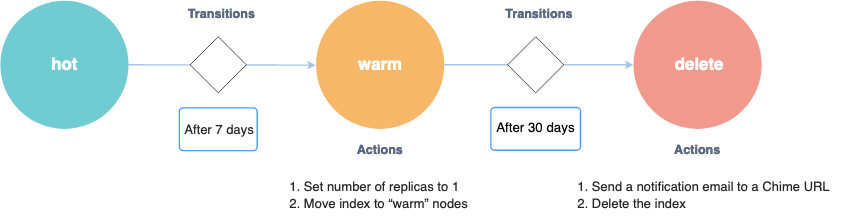
- Actions:
accions que s'executen quan s'entra en
aquell estat ("set number of replicas to
1", "move index to warm nodes"; "send a
notification email", "delete the index")
- si hi ha definides diverses
accions, només quan una acció acaba
amb èxtit, al cap de
plugins.index_state_management.job_interval(5 minuts) s'executa la següent; es poden definirtimeoutiretry - accions possibles / ISM
supported operations:
force_merge, read_only, read_write, replica_count, shrink, close, open, delete, rollover, notification, snapshot, index_priority, allocation, rollupclose: Closed indexes remain on disk, but consume no CPU or memory. You can’t read from, write to, or search closed indexes. Closing an index is a good option if you need to retain data for longer than you need to actively search it and have sufficient disk space on your data nodes. If you need to search the data again, reopening a closed index is simpler than restoring an index from a snapshot.rollover: Rolls an alias over to a new index when the managed index meets one of the rollover conditions.rollup: reduce data granularity by rolling up old data into summarized indexes.notification: envia una notificació a Slack, Amazon Chime, webhook URLsnapshot: (snapshots) ...- ...
- si hi ha definides diverses
accions, només quan una acció acaba
amb èxtit, al cap de
- Transitions:
condicions (
conditions: "after 7 days"; "after 30 days") que s'han de complir (hi ha un job que ho comprova cada 5 minuts) per anar cap a un altre estat (state_name). After all actions in the current state are completed, the policy starts checking the conditions for transitions.
- Error notifications
- ...
- Cada policy (màquina d'estats) defineix:
- attach policies to indexes
- manage indexes
- set up policies
- ...
- Steps
- Index transforms
- ...
- Index rollups
- ...
- ...
- CRUD
- CREATING AND TUNING YOUR CLUSTER
- Availability and recovery
- Snapshots
- Take
and restore snapshots
- Register repository
- shared file system
- Amazon S3
- when using Amazon OpenSearch service:
see Registering
a manual snapshot repository
- prerequisites
- create S3 bucket
- create policy (to be attached
to role in next step)
- JSON
{

                                                            "Version":
                                                          "2012-10-17",

                                                            "Statement": [{


                                                          "Action": [


                                                          "s3:ListBucket"


                                                          ],


                                                          "Effect": "Allow",


                                                          "Resource": [


                                                          "arn:aws:s3:::s3-bucket-name"


                                                          ]

                                                              },

                                                              {


                                                          "Action": [


                                                          "s3:GetObject",


                                                          "s3:PutObject",


                                                          "s3:DeleteObject"


                                                          ],


                                                          "Effect": "Allow",


                                                          "Resource": [


                                                          "arn:aws:s3:::s3-bucket-name/*"


                                                          ]

                                                              }

                                                            ]

                                                          }
- Name: bucket-mybucket-read-write
- JSON
- create IAM role
- Select trusted entity
- Trusted entity type: Custom trust policy
- Custom trust policy:
{


                                                               "Version":
                                                              "2012-10-17",


                                                               "Statement":
                                                              [


                                                               {


                                                               "Sid": "",


                                                               "Effect":
                                                              "Allow",


                                                               "Principal":
                                                              {


                                                               "Service":
                                                              "es.amazonaws.com"


                                                               },


                                                               "Action":
                                                              "sts:AssumeRole"


                                                               }


                                                               ]

                                                              }
- Add permissions
- bucket-mybucket-read-write (created in previous step)
- Name, review and create
- Role name:
role-opensearch-snapshots-bucket-mybucket(in docs:TheSnapshotRole)
- Role name:
- Select trusted entity
- permissions
- ...
- Map
the snapshot role in OpenSearch
Dashboards (if using fine-grained
access control)
- Dashboards
- Security > Roles
- manage_snapshots
- Mapped users >
Manage mapping
- Backend roles:
(arn for
role-opensearch-snapshots-bucket-mybucket)
- Backend roles:
(arn for
- Mapped users >
Manage mapping
- manage_snapshots
- Security > Roles
- Dashboards
- Directly type user arn in
Management > Security > Roles
> manage_snapshots > Mapped
users > Manage mapping > Users
- NOTE: no need to add a new internal user; just type arn in the case
- Register
a repository
- Using PUT or
- Using
the sample Python client:
- register-repo-mybucket.py
- Problems:
-
no permissions for [cluster:admin/repository/put] and User [name=arn:aws:iam::xxxx:user/my_user, backend_roles=[], requestedTenant=null]"- Solution:
- directly
type
arn:aws:iam::xxxx:user/my_userin Management > Security > Roles > manage_snapshots > Mapped users > Manage mapping > Users
- directly
type
- Solution:
-
- Problems:
- register-repo-mybucket.py
- prerequisites
- when using Amazon OpenSearch service:
see Registering
a manual snapshot repository
- Hadoop Distributed File System (HDFS)
- Microsoft Azure
- Take snapshots
- Restore snapshots
- Get all snapshots in all repositories
GET /_snapshot/_all
- Get all snapshots in a given repository
GET
                                          /_snapshot/my-repository/_all
- Restore a snapshot
- ...
- Get all snapshots in all repositories
- Register repository
- Snapshot management (SM)
- using Index Management (IM) Plugin
- Dashboards: Management > Snapshot
Management
- Snapshot policies
- Searchable snapshots
- Opster
- OpenSearch Searchable Snapshots
- OpenSearch UltraWarm (Sep 20, 2023)
- Opster
- Take
and restore snapshots
- Snapshots
- Availability and recovery
- Cluster
- API
GET _cluster/stats/nodes/_all
- Optimal sizes
-
...
... real usage minimum storage Calculating storage requirements minimum_storage = Source_data * (1 + number_of_replicas) * (1 + indexing_overhead) / (1 - Linux_reserved_space) / (1 - OpenSearch_service_overhead)minimum_storage = Source_data * (1 + number_of_replicas) * 1.45
_cat/indices?v_cat/allocation?v- Dashboards: Index Management > Indexes
- Total size (= Size of primaries * (1+number_of_replicas) + overhead)
number of shards Choosing the number of shards - the number of primary shards cannot be changed for an existing index
- default:
- AWS OpenSearch Service: 5 primary shards + 1 replica = 10 shards
- open source OpenSearch: 1 primary shard + 1 replica = 2 shards
- optimal size of a shard:
- where search latency is a key performance objective: 10-30 GiB / shard
- for write-heavy workloads such as log analytics: 30-50 GiB / shard
number_of_primary_shards = (Source_data + room_to_grow) * (1 + indexing_overhead) / desired_shard_size- Maximum shards per node
- default: 1000 shards / node
cluster.max_shards_per_node
- ...
Choosing instance types and testing
Aquesta taula continua cap a la dreta — desplaça-la o gira el mòbil.
-
- Sizing
Amazon OpenSearch Service domains
- Calculating
storage requirements
- Categories
- Long-lived index: website, document, ecommerce search
- Rolling indexes: log analytics, time-series processing, clickstream analytics
- Categories
- Choosing the number of shards
- Choosing instance types and testing
- Calculating
storage requirements
- Configuring
a multi-AZ domain in Amazon OpenSearch Service
- Shard distribution
- cada AZ ha de tenir, sumant tots els nodes de dades d'aquella AZ, tots els shards, ja siguin els primaris o les rèpliques
- standby
- with standby: una de les AZ està en stand-by
- without standby: totes les AZ estan actives, però l'usuari ha de gestionar bé el nombre de primaris i de rèpliques (almenys 1 rèplica)
- Availability zone disruptions
- Shard distribution
- Index
State Management
- policies to transition states: e.g. hot -> warm -> cold
- Example policy (with diagram)
- Optimizing
Storage in AWS OpenSearch: Reducing Costs and
Enhancing Efficiency by up to 85%
- Tiers
- Hot tier
- Warm tier
- Cold tier
- Tiers
- ...
- API
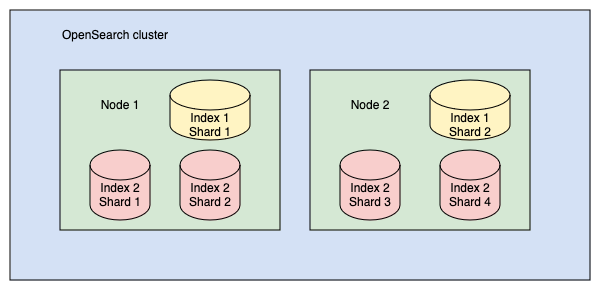
- Shards and nodes
- Each shard stores a subset of all documents in an index
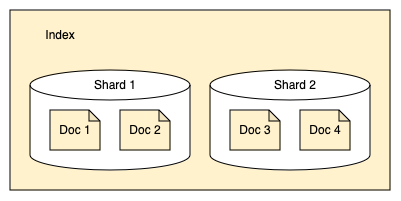
- Shards are used for even distribution across nodes in a
cluster. A good rule of thumb is to limit shard size to
10–50 GB. (index 1: split into 2 shards; index 2: split into
4 shards)
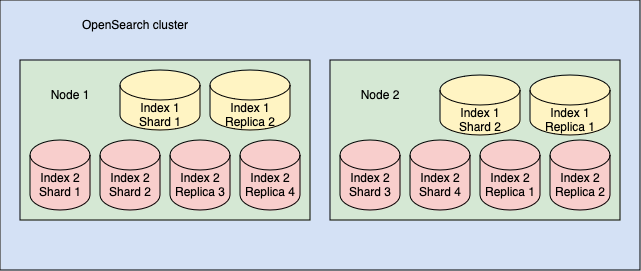
- Primary and replica shards (index 1: 2 primary shards + 2
replica shards; index 2: 4 primary shards + 4 replica
shards). Default: 5 primary shards + 1 replica = 10 shards
- Each shard stores a subset of all documents in an index
- ...
03Seguretat / Security#
- Usuaris / Users
- OpenSearch
Dashboards multi-tenancy
- "Tenants in OpenSearch Dashboards are spaces for saving index patterns, visualizations, dashboards, and other OpenSearch Dashboards objects. OpenSearch allows users to create multiple tenants for multiple uses."
- Defining
users and roles
- Defining
read-only roles
- Cluster permissions:
cluster_composite_ops_ro - Index permissions:
- Index: my_index
- Index permissions: read
- Tenant permissions
- Tenant: ...
- Read only
- Cluster permissions:
- Predefined roles
- Defining
read-only roles
- OpenSearch
Dashboards multi-tenancy
- ...
04Clients#
- Clients
- OpenSearch Dashboards
- Self-hosted
- Amazon OpenSearch Service
- Go to details and click on url
- Problemes / Problems
{"Message":"User: anonymous is not authorized to perform: es:ESHttpGet with an explicit deny in a resource-based policy"}- Solució / Solution
- Amazon OpenSearch Service / Domains
- select your domain and go to tab "Security configuration"
- Access policy:
...

                                                  "Effect": "Deny"
                                                  "Allow"
- Amazon OpenSearch Service / Domains
- Solució / Solution
- OpenSearch Dashboards quickstart guide
- Dark mode
- Management / Dashboards Management / Advanced settings / Appearance / Dark mode
- Dev Tools console
- Discover
- ...
- REST API
- Common REST parameters
- Health
curl -X GET "https://localhost:9200/_cluster/health?pretty"
                              -ku admin:...
- Python
- High-level
Python client
pip
                                install opensearch-dsl
- Low-level
Python client
pip install opensearch-py
- High-level
Python client
- ...
- OpenSearch Dashboards
-
REST API (curl -X ...) Dev Tools (OpenSearch Dashboards) health GET "https://localhost:9200/_cluster/healthGET _cluster/healthdisk usage
GET _cluster/stats/nodes/_all

                          GET /_cat/indices?v

                          GET _cat/allocation?v
index a document
(add an entry to an index)
(indexstudentsis automatically created)PUT https://<host>:<port>/<index-name>/_doc/<document-id>PUT /students/_doc/1
{
"name": "John Doe",
"gpa": 3.89,
"grad_year": 2022
}dynamic mapping
GET /students/_mapping
Search your data
GET /students/_search

 GET
                          /students/_search

                          {

                            "query": {

                              "match_all": {}

                            }

                          }
Updating documents (total upload)
PUT /students/_doc/1

                          {

                            "name": "John Doe",

                            "gpa": 3.91,

                            "grad_year": 2022,

                            "address": "123 Main St."

                          }
Updating documents (partial upload)
POST /students/_update/1/

                          {

                            "doc": {

                              "gpa": 3.74,

                              "address": "123 Main St."

                            }

                          }
Delete a document
DELETE /students/_doc/1Delete index
DELETE /students
Index mapping and settings
PUT /students

                          {

                            "settings": {

                              "index.number_of_shards": 1

                            },

                            "mappings": {

                              "properties": {

                                "name": {

                                  "type":
                          "text"

                                },

                                "grad_year": {

                                  "type":
                          "date"

                                }

                              }

                            }

                          }


GET /students/_mapping
Bulk ingestion POST "https://localhost:9200/_bulk" -H 'Content-Type: application/json' -d'
{ "create": { "_index": "students", "_id": "2" } }
{ "name": "Jonathan Powers", "gpa": 3.85, "grad_year": 2025 }
{ "create": { "_index": "students", "_id": "3" } }
{ "name": "Jane Doe", "gpa": 3.52, "grad_year": 2024 }
'POST _bulk
{ "create": { "_index": "students", "_id": "2" } }
{ "name": "Jonathan Powers", "gpa": 3.85, "grad_year": 2025 }
{ "create": { "_index": "students", "_id": "3" } }
{ "name": "Jane Doe", "gpa": 3.52, "grad_year": 2024 }Ingest from local json files (sample mapping) curl -H "Content-Type: application/json" -X PUT "https://localhost:9200/ecommerce" -ku admin:<custom-admin-password> --data-binary "@ecommerce-field_mappings.json"
Ingest from local json files (sample data) curl -H "Content-Type: application/x-ndjson" -X PUT "https://localhost:9200/ecommerce/_bulk" -ku admin:<custom-admin-password> --data-binary "@ecommerce.ndjson"
Query
GET /ecommerce/_search

                          {

                            "query": {

                              "match": {

                                "customer_first_name":
                          "Sonya"

                              }

                            }

                          }
Query string queries
GET /students/_search?q=name:john
Aquesta taula continua cap a la dreta — desplaça-la o gira el mòbil.
- Ingest
your data into OpenSearch
- ...
Ingest individual documents Index multiple documents in bulk Use Data Prepper Other ingestion tools Aquesta taula continua cap a la dreta — desplaça-la o gira el mòbil.
- ...
- Search
your data
-
Query string query language GET /students/_search?q=name:johnQuery domain-specific language (DSL) GET /students/_searchimplicit OR:
{
"query": {
"match": {
"name": "john"
}
}
}
                              GET /students/_search

                              {

                                "query": {

                                  "match": {

                                    "name": "doe john"

                                  }

                                }

                              }
                              GET students/_search

                              {

                                "query": {

                                  "bool": {

                                    "filter": [

                                      { "term":
                              { "grad_year": 2022 }}

                                    ]

                                  }

                                }

}:Compound queries
GET students/_search
{
"query": {
"bool": {
"filter": [
{ "range": { "gpa": { "gt": 3.6 }}}
]
}
}
}SQL
Piped Processing Language (PPL)
Dashboards Query Language (DQL):
Aquesta taula continua cap a la dreta — desplaça-la o gira el mòbil.
-
- ...
05Índexs / Indexes#
- Managing
indexes
- ...
06Query DSL#
-
query
Boolean query
mustAND GET _search
{
"query": {
"bool": {
"must": [
{}
],
"must_not": [
{}
],
"should": [
{}
],
"filter": {}
}
}
}must_notNOT shouldOR filterAND Aquesta taula continua cap a la dreta — desplaça-la o gira el mòbil.
Filter context Query context
Term-level queries Full-text queries
- no relevance
- cached
- exact matches
- not for text (except keyword)
- relevance
- not cached
- non-exact matches
- for text
termvalueboostcase_insensitive
terms
terms_settermsminimum_should_match_fieldminimum_should_match_scriptboost
idsvalluesboost
rangeoperatorsgtegtltelt
formatrelationboosttime_zone
prefixvalueboostcase_insensitiverewrite
existsboost
fuzzyvalueboostfuzzinessmax_expansionsprefix_lengthrewritetranspositions
wildcardvalueboostcase_insensitiverewrite
regexpvalueboostcase_insensitiveflagsmax_determinized_statesrewrite
Aquesta taula continua cap a la dreta — desplaça-la o gira el mòbil.
intervalsrule parameters matchqueryanalyzerfiltermax_gapsordereduse_field
prefix...
wildcard
fuzzy
all_of
any_of
Aquesta taula continua cap a la dreta — desplaça-la o gira el mòbil.
matchqueryauto_generate_synonyms_phrase_queryanalyzerboostenable_position_incrementsfuzzinessfuzzy_rewritefuzzy_transpositionslenientmax_expansionsminimum_should_matchoperatorprefix_lengthzero_terms_query
match_bool_prefixqueryanalyzerfuzzinessfuzzy_rewritefuzzy_transpositionsmax_expansionsminimum_should_matchoperatorprefix_length
match_phrasequeryanalyzerslopzero_terms_query
match_phrase_prefixqueryanalyzermax_expansionsslop
multi_matchqueryauto_generate_synonyms_phrase_queryanalyzerboostfieldsfuzzinessfuzzy_rewritefuzzy_transpositionslenientmax_expansionsminimum_should_matchoperatorprefix_lengthsloptie_breakertypezero_terms_query
query_stringqueryallow_leading_wildcardanalyze_wildcardanalyzerauto_generate_synonyms_phrase_queryboostdefault_fielddefault_operatorenable_position_incrementsfieldsfuzzinessfuzzy_max_expansionsfuzzy_transpositionsmax_determinized_statesminimum_should_matchphrase_slopquote_analyzerquote_field_suffixrewritetime_zone
simple_query_string
Aquesta taula continua cap a la dreta — desplaça-la o gira el mòbil.
aggs
Aquesta taula continua cap a la dreta — desplaça-la o gira el mòbil.
- ...
07Anàlisi de text / Text analysis#
- Mapping parameters
- Analyzer:
- source text -> 1. char_filter -> 2. tokenizer -> 3. token filter -> terms
- Classification:
- index analyzer: at indexing time
- search analyzer: at query time
- Testing
an analyzer
- Analyze
API
- Apply
a built-in analyzer
GET /_analyze

                                  {

                                    "analyzer" : "standard",

                                    "text" : "OpenSearch text analysis"

                                  }
- Apply
a custom analyzer
GET /books2/_analyze

                                  {

                                    "analyzer": "lowercase_ascii_folding",

                                    "text" : "Le garçon m'a SUIVI."

                                  }
- Apply
a built-in analyzer
- Analyze
API
- Exemples / Examples
- url
- Analyze URL paths to search individual elements in Amazon Elasticsearch Service
PUT scratch_index

                              {

                                "settings": {

                                  "analysis": {

                                    "char_filter": {

                                      "my_clean":
                              {


                              "type": "mapping",


                              "mappings": ["/ => \\u0020",


                              "s3: => \\u0020"]

                                      }

                                    },

                                    "tokenizer": {

                                      "my_tokenizer":
                              {


                              "type": "simple_pattern",


                              "pattern": "[a-zA-Z0-9\\.\\-]*"

                                      }

                                    },

                                    "analyzer": {


                              "s3_path_analyzer": {


                              "char_filter": ["my_clean"],


                              "tokenizer": "my_tokenizer",


                              "filter": ["lowercase"]

                                      }

                                    }

                                  }

                                },

                                "mappings": {

                                    "properties": {


                              "s3_key": {


                              "type": "text",


                              "analyzer": "s3_path_analyzer"

                                      }

                                    }

                                }

                              }
PUT scratch_index
{
"settings": {
"analysis": {
"char_filter": {
"url_clean": {
"type": "mapping",
"mappings": ["/ => \\u0020",
"https: => \\u0020"]
}
},
"tokenizer": {
"url_tokenizer": {
"type": "simple_pattern",
"pattern": "[a-zA-Z0-9\\.\\-]*"
}
},
"analyzer": {
"url_path_analyzer": {
"char_filter": ["url_clean"],
"tokenizer": "url_tokenizer",
"filter": ["lowercase"]
}
}
}
},
"mappings": {
"properties": {
"my_url_field": {
"type": "text",
"analyzer": "url_path_analyzer"
}
}
}
}
- url
- Normalizer
-
set get PUT my_index
{
"settings": {
"analysis": {
"char_filter": {
"my_char_filter": {}
},
"tokenizer": {
"my_tokenizer": {}
},
"filter": {
"my_filter": {}
},
"analyzer": {
"my_analyzer": {
"type": "custom",
"char_filter": ["my_char_filter"],
"tokenizer": "my_tokenizer",
"filter": ["my_filter"]
}
}
}
}
"mappings": {
"properties": {
"my_field": {
"analyzer": "my_analyzer"
}
}
}
}GET my_index/_settings
GET my_index/_mappingAquesta taula continua cap a la dreta — desplaça-la o gira el mòbil.
- ...
http://www.francescpinyol.cat/opensearch.html
Primera versió: / First version: 9.XI.2024
Darrera modificació: 23 de juny de 2025 / Last update: 23rd June
2025